
How to Create Your Own Anime Character Online
From first concept to a fully styled OC, no drawing skills or artistic background required.
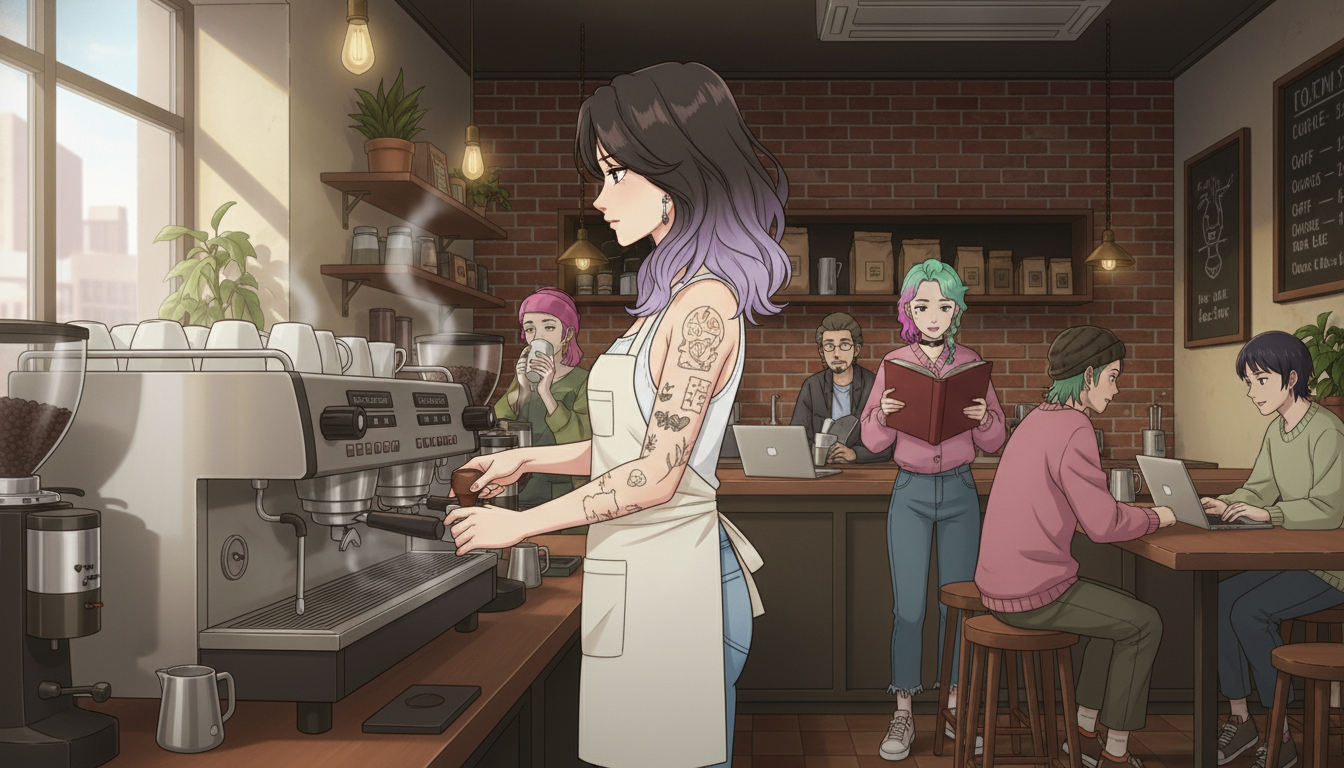
Creating your own anime character used to require either drawing ability or a very long commission waitlist. The first option took years to develop, and the second cost real money and produced a character someone else technically made. Neither was satisfying if what you actually wanted was creative control: deciding exactly how the character looks, what style she lives in, and what kind of story she belongs to. In 2026, AI character creation tools have closed that gap. The result is that the creative decisions, which were always the interesting part, are genuinely yours, and the production work that required technical skill is handled by the tool.
This guide covers the full process of creating an original anime character online: from concept to style selection, physical customization, and placing the character into scenes that make her feel like someone with a life beyond the frame.
👉 Start Building Your Anime OC — Free on AutoWeebStep 1: Define who your character is before you decide what she looks like.
Design decisions that start with personality produce more coherent characters than design decisions that start with aesthetics. A character whose visual choices follow from who she is tends to read as a real person rather than a collection of appealing features. This step takes ten minutes and changes everything downstream.
Ask three questions before touching any controls. What does she do when no one's watching? What does she want, and what's stopping her from getting it? What's the one visual detail that, if you changed it, would make her feel like someone else entirely? The answers don't have to be novel. A barista with arm tattoos who is quietly determined and slightly closed-off is a completely workable character, because those three traits generate dozens of visual and narrative decisions automatically.
The distinction between an original character and a character design is the difference between someone with an interior life and someone who's just well-dressed. Both are worth making, but if you want an OC you'll keep returning to rather than one you'll abandon after the first generation, start with who she is.
Step 2: Choose an art style that matches the story your character lives inside.
Art style is not decoration applied on top of character design. It's the world the character belongs to. A character designed in a soft slice-of-life aesthetic exists in a completely different emotional register than the same character rendered in a sharp urban thriller style. The features can be identical; the story implications are entirely different.
Think about the genre first. Slice-of-life and josei styles suit characters with grounded, everyday lives: warm color palettes, soft linework, naturalistic body proportions. Shonen-adjacent styles suit characters who are heading toward something: higher contrast, bolder outlines, more expressive posture. Seinen styles tend to produce more restrained, detailed characters who feel like adults rather than archetypes. AutoWeeb's style library covers the range, and browsing it with your character concept in mind is faster than trying to describe the style you want from scratch.
One practical note: if you plan to place your character into scene backgrounds later, choose a style that exists on a realistic-to-stylized spectrum that matches the scenes you have in mind. A heavily stylized character dropped into a photorealistic background produces a compositing problem. A character designed in a grounded anime style can live in a much wider range of environments.
Step 3: Customize the physical details that make your character recognizably hers, not generically appealing.
Generic character outputs tend to share the same features: bright round eyes, a conventional hair color, an unspecific face that could belong to anyone. The customization step is where you move the result away from that default. The goal is specificity, not necessarily complexity.
Hair is the most readable identity signal in anime character design.
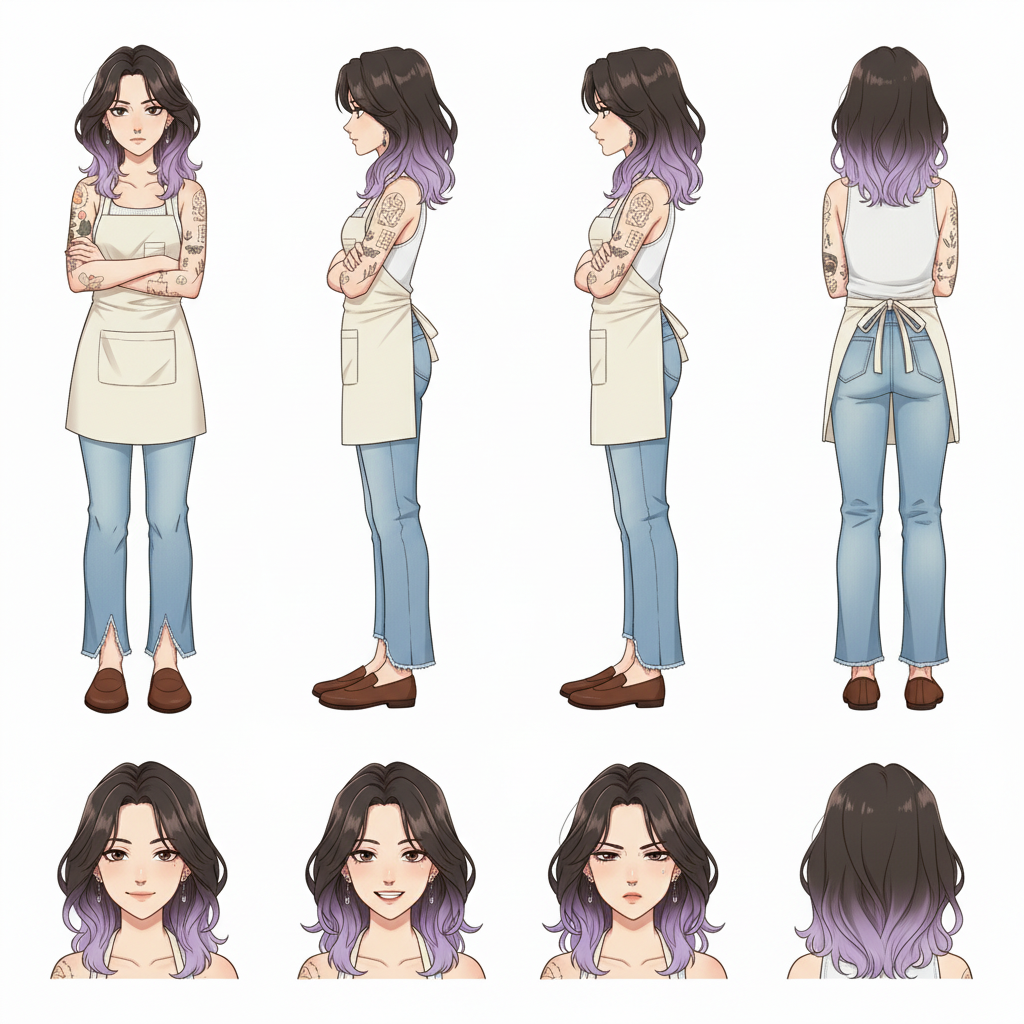
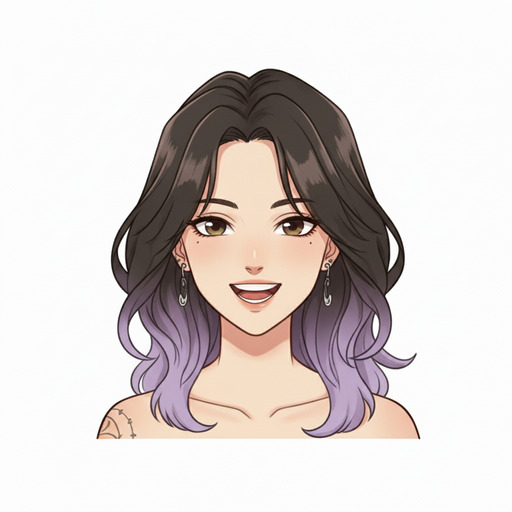
Anime conventions have trained audiences to read character type from hair almost instantly. Dark-to-violet ombre communicates a specific combination of groundedness and latent intensity. Silver streaks on dark hair suggest someone who's been through something and came out the other side. Single-color muted hair on a protagonist signals someone whose personality will carry the design. Be intentional. Don't pick a hair color because it looks attractive in isolation; pick one that says something about who this person is when the story gets difficult.
Prompt phrasing that produces specific, readable results: dark brown to soft lavender ombre, shoulder-length with natural wave, slight flyaways near the crown. That is more useful to the AI than pretty purple hair, and it produces a character you'll recognize across multiple generations.
Distinguishing physical details anchor the character across different scenes.
Tattoos, scars, freckles, unusual eye colors, distinctive jewelry: these are the details that make a character immediately recognizable even in a new scene or a new style variant. They also imply story without requiring exposition. A character with sleeve tattoos and safety pin earrings has already communicated something about her background and aesthetic sensibility before she says a word.
Useful prompt additions for this kind of specificity: floral sleeve tattoos on left arm, small safety pin earrings, faint scar above right eyebrow, warm brown eyes with a slight downward tilt. Each detail does work. The scar alone implies something happened. The earrings imply a DIY aesthetic sensibility. None of this requires a backstory paragraph; it's visual shorthand that anime as a medium uses constantly.
Outfit choices frame the character's social and economic world.
A white sleeveless top and an apron places the character in a working context and suggests someone who's physically present in the world rather than abstracted from it. Cropped flare jeans and loafers add a casual, slightly fashion-conscious layer that complicates the purely functional read of the apron. Outfit design is world-building by other means. What someone wears tells you where they spend their time and how much they care about being seen.
Step 4: Place your character into a scene to move from character design into actual storytelling.
A character standing against a white background is a design. A character at an espresso machine in a brick-walled coffee shop while strangers read books behind her is a story. The scene tells you what her morning looks like, what kind of environment she moves through, and what kind of story you might follow her through. Getting your character into a scene is not the final step of a design process. It's the beginning of something else.
AutoWeeb's photo pack scene backgrounds are the fastest way to do this without building scenes from scratch. Slice-of-life backgrounds place the character in everyday environments, Japan city life sets create an urban register, the beach OVA pack shifts the register entirely toward something lighter. The same character reads differently depending on the context you put her in, and experimenting with that is part of understanding who she is.
Scene prompts that produce strong, narratively specific results: interior coffee shop, warm tungsten lighting, steam rising from an espresso machine, other customers in soft focus in the background, character facing slightly left with her weight on one hand. The out-of-focus background customers add life without competing with the character. The specific weight shift on the hand implies a mood. These details don't require elaborate setup; they just require specificity about the physical world the character occupies.
Once your character is saved in AutoWeeb's character creator, you can regenerate her across different scene backgrounds without rebuilding from scratch. The character design stays consistent; the scenes change to match what you're building toward.
How to build a consistent character across multiple scenes and over time.
Consistency is the difference between a one-off generation and an OC you'll actually use. A character who looks slightly different every time you generate her isn't really a character; she's a series of similar-looking images. Getting consistency requires a saved character profile and a repeatable set of descriptors you return to across sessions.
Save your character after the first session you're satisfied with. Note the specific prompt language that produced the version you want to keep, particularly for hair color, eye shape, and any distinguishing details. When you return to the character later, using the same anchoring descriptors alongside the new scene or context keeps the design coherent across time.
Consider generating a character sheet early, showing your OC from multiple angles and with a few different expressions. This is both a practical reference tool and a useful creative exercise. Designing the character across multiple views forces you to resolve design decisions you might have left vague in a front-facing portrait. The way her hair falls from behind, what her resting expression looks like versus a surprised one: these decisions matter when you start placing her into scenes where the camera angle changes.
👉 Create Your Original Anime Character on AutoWeeb — Free to StartFrequently asked questions about creating your own anime character online.
How do I create my own anime character online without any drawing skills?
AI anime character creators like AutoWeeb work through photo upload, visual pickers, and text descriptions rather than drawing. You make decisions about your character's appearance, personality, and style through selection and description, and the AI generates the actual image. No artistic ability is required. The creative work is deciding who the character is and what she looks like. The production is entirely handled by the tool.
What is the best AI anime character creator in 2026?
The best tool for creating an original anime character depends on what you're building toward. If you want a character you can reuse across different scenes and contexts, rather than a single static image, you need a tool with a character library and scene placement features. AutoWeeb is designed around that workflow: you create the character once, save her, and generate new scene variants without rebuilding. Tools that produce single high-quality images exist, but they don't support the consistency that makes an OC usable over time.
How do I make an original anime character (OC) that feels unique and not generic?
Specificity in every design decision is what separates a distinctive OC from a generic output. That means specific hair colors rather than generic ones, named distinguishing details like tattoos or unusual jewelry, a clear art style choice tied to the character's genre, and an outfit that implies a world. The starting point is always personality: design decisions that follow from who the character is tend to produce coherent results, while design decisions that start from "what looks cool" tend to produce characters who feel assembled rather than imagined.
Can I customize my anime character's art style, not just her appearance?
Yes. Art style selection is a core part of the character creation process in AutoWeeb. You can choose from styles that range across anime genres, from slice-of-life and josei to shonen-adjacent, seinen, and specific style references. The style you choose determines the overall visual register of the character and affects how her physical features read. The same face designed in a soft slice-of-life style and a sharp urban thriller style will feel like two different characters even if the underlying features are identical.
How do I make my anime character look consistent across multiple images?
Consistency requires a saved character profile and a repeatable set of specific descriptors for the features that define the design: hair color and cut, eye color and shape, any distinguishing details like tattoos or scars. When generating new scenes or poses, returning to the same anchoring descriptors keeps the character recognizable across sessions. Generating a character sheet early in the process, with multiple angles and expressions, gives you a reference to check new generations against and forces you to resolve design decisions that might otherwise drift.
What should I include in an anime character description to get a good AI result?
Effective character descriptions are specific about the features that matter and avoid generic modifiers. Include hair color as a specific tone or combination rather than just a color name, eye color and shape, any distinguishing physical details, the character's emotional register or expression, and the art style you're working in. For example: warm brown eyes with a slight downward tilt, dark brown to soft lavender ombre hair at shoulder length, floral sleeve tattoos, resting expression that reads as calm rather than cold, in a grounded contemporary anime style. Each element does specific work and gives the AI clear parameters rather than interpretive latitude.
Can I use my original anime character in different scenes and stories?
Yes, and this is one of the core use cases AutoWeeb is built around. Once your character is saved, you can place her into different scene environments using the photo pack backgrounds, generate new portrait variations at different emotional beats, and use her across content like social media posts, short story visuals, or personal projects. The character design stays consistent across all of these because she's anchored to a saved profile rather than regenerated from scratch each time.
Is creating an anime character online free?
AutoWeeb offers a free tier that lets you create and save an original anime character, generate initial scene placements, and explore the style library. More extensive generation, access to all scene backgrounds, and video features are available on paid plans. For a first character and a basic set of scene variants, the free tier covers the full creation workflow.
If you want to take your character further into visual storytelling, the guide to the best AI tools for anime storytelling covers how to build composed scenes and develop an original story arc around a character like this. For placing your OC into specific scene environments systematically, the photo packs guide covers how to work through different background sets without losing visual consistency.