
How to Make AI Anime Fight Scenes Look Professional
Choreography, camera angles, speed, impact effects, and emotional stakes — the complete prompting guide for AI anime fight scenes that hit like the real thing.
The difference between an AI anime fight scene that looks professional and one that looks like a posed screengrab comes down to one thing: specificity at every layer. Speed alone isn't enough. Camera angles alone aren't enough. Impact effects without emotional context are just visual noise. Professional anime fight scenes work because every element, from the arc of a punch to the expression on the losing character's face, has been directed. Your prompts need to do the same.
This guide covers the five layers that define a fight scene prompt: choreography, camera angles, speed and motion, impact effects, and emotional stakes. Each layer is explained with concrete prompting language. The final section covers how AutoWeeb's prompt analysis catches the gaps before you generate.
Choreography: prompt the exchange, not just the moment.
Most fight scene prompts describe a single frozen action: "she punches him." That's a moment, not choreography. Choreography is a sequence with cause and effect built in. One fighter commits to an attack. The other reads it, reacts, and counters or takes the hit. The body weight shifts. The momentum carries through. Even a three-second clip can contain a full exchange if the prompt describes the arc.
Weak prompt: two anime characters fighting each other.
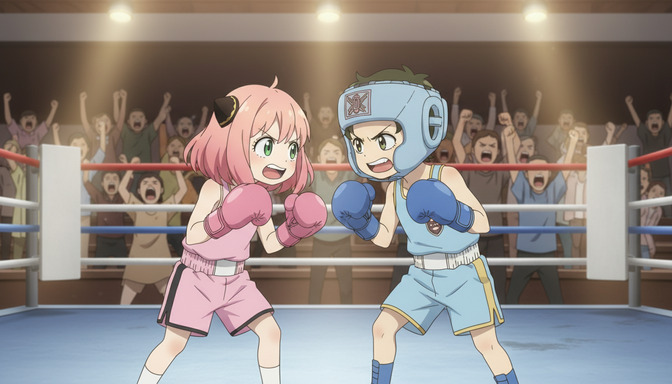
Choreographed prompt: a pink-haired girl in boxing gloves loading a right hook from her hip, weight transferring through her back foot, the green-haired boy in blue headgear leaning back too late, the punch connecting at his chin guard, his head snapping to the right on impact.
The choreographed version tells the model who threw, what kind of punch, where the weight was, whether the defender reacted, and what happened on contact. The model isn't interpolating the fight. It's executing a fight you already directed.
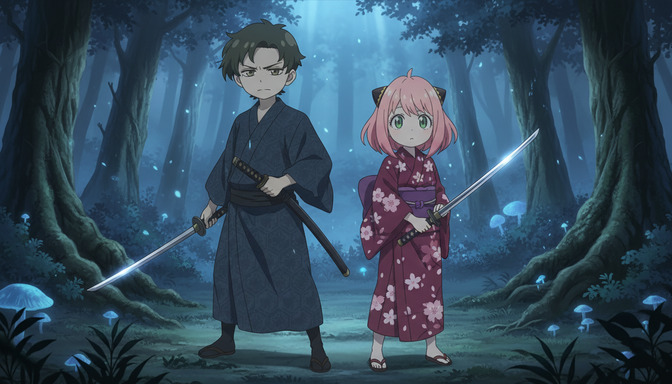
For sword fights and martial arts, the same logic applies. Describe the stance entry, the blade contact point, the follow-through or check. A teenage girl in a dark yukata stepping forward into a single-handed overhead cut, blade descending at a steep angle toward her opponent's left shoulder, the boy in a navy kimono raising his katana flat to deflect, both blades locked at the crossguard gives the model a full beat to work with, not just a static "two people with swords."
Camera angles: the shot determines what the fight means.
Camera direction is the highest-leverage prompt layer most people skip, and in fight scenes it matters more than anywhere else. The same exchange reads completely differently depending on where the camera sits.
Low angle looking up at the attacker makes them feel dominant, overwhelming. High angle looking down on a fighter taking a hit makes them feel small, vulnerable. A tight close-up on the hand releasing the sword makes the moment feel deliberate, ceremonial. A wide tracking shot following both fighters simultaneously creates spectacle and scale. A static medium shot from ringside lets the footwork and technique read clearly. A fast whip pan from one fighter to the other creates chaos and speed.
Pick one camera direction per clip. State it explicitly at the start or end of your prompt so it doesn't get buried. Useful options:
- low angle looking up, camera at ground level behind the fighter's feet
- close-up on the fist the moment before impact, shallow focus
- wide static shot from outside the ring showing both fighters and the crowd
- tracking shot from the defender's shoulder perspective, attacker approaching fast
- over-the-shoulder looking past the attacking fighter toward the opponent's face
- Dutch angle from the left, both characters at the top of their exchange
One direction per prompt. If you want multiple angles across the same exchange, that's multiple clips, each with its own camera instruction.
Speed and motion: prompt what's fast, what's slow, and what that means.
Anime fight sequences use speed selectively. Not every movement is fast. The wind-up is often slow and deliberate to build tension. The strike itself is instantaneous. The aftermath, the character landing, staggering, or standing still, can be slow again for impact. Prompting the rhythm of fast and slow within a beat produces a much more professional result than defaulting to "fast action."
Specific speed and motion language that works:
- a single sharp burst of speed, body a blur for half a second
- slow-motion as the punch lands, coat frozen mid-swing, dust rising
- rapid footwork in three quick steps, then a dead stop
- the blade moving too fast to track, only the wind pressure visible as the grass bends
- a deliberate half-second pause before the follow-through, breath held
Speed lines are one of the most identifiable visual elements of anime action. To trigger them explicitly, include them in the prompt: white radial speed lines emanating from the point of impact or horizontal motion blur streaking behind the fighter's extended arm. Without prompting them, you may or may not get them depending on the model's defaults for the style you've specified.
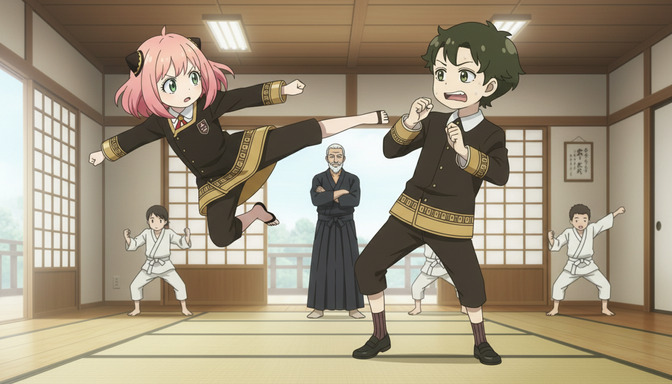
Impact effects, like shockwaves, cracked ground, dust rings, sparks from blade contact, and the visible deformation of cloth or hair from force, follow the same rule: prompt them explicitly or leave their presence to chance. A burst of air pressure radiating outward from the kick, dust and debris lifting from the dojo floor in a ring is a complete impact effect description. The swords clash, sparks scattering off the crossguard, both fighters' sleeves rippling from the force gives the model everything it needs to render contact with physical weight.
Emotional stakes: the fight only matters if the character does.
Two characters exchanging technically perfect choreography with no emotional context produces a demo reel, not a scene. The best anime fights are remembered because of what they mean to the characters in them, not because the punches were fast. The emotion is what gets carried into the next episode.
Emotional stakes operate at two levels in a prompt: the facial expression and the body language. Both can be specified.
Facial expression examples: teeth gritted, eyes wide and panicked, expression flat and cold, like this is maintenance not combat, tears visible at the corners of her eyes while she throws the punch, a half-smile, like he's enjoying this more than he should.
Body language examples: shoulders hunched and defensive, not aggressive, back straight and completely still before the draw, samurai composure, one arm hanging useless at his side, still fighting with the other, she's not retreating, she's buying time, and her posture shows the difference.
The emotional layer doesn't require much length. A single well-chosen phrase does more than three generic descriptors. Quiet fury, jaw set is better than angry and determined and focused. The specificity is what the model translates into posture, expression, and motion.
How AutoWeeb's prompt analysis improves fight scene output.
Fight scene prompts are structurally more complex than most other AI anime prompts because they have more moving parts: at least two characters, a defined sequence of movement, camera direction, impact effects, and emotional grounding, all in a single clip. Any missing layer produces a visible gap in the output.
AutoWeeb's prompt analysis evaluates your prompt before generation and identifies which structural layers are complete, which are vague, and which are absent. For fight scenes specifically, it flags the problems that cause the most consistent failures: character descriptions that aren't specific enough to maintain visual consistency across clips, action language that describes a pose instead of a beat, missing camera direction, impact effects that aren't named, and emotional state that's been omitted entirely.
The analysis works for both image and video prompts. For video, it evaluates whether the action described covers one beat cleanly or is trying to sequence too many events in a single clip. A prompt that covers four separate exchanges in one generation will produce something rushed and visually incoherent. AutoWeeb's prompt analysis catches that and suggests where to break the sequence into separate clips before you spend the generation credit.
For still images, the same structural evaluation applies. A fight scene still needs a defined moment of contact, a camera angle, an art style that handles motion well, and character expressions that sell the emotional weight of that specific instant. The prompt analysis identifies which of those are present and which are underspecified, and it applies those corrections to both image and video prompts in the same interface.
The practical result is that correcting a weak fight scene prompt takes thirty seconds instead of a failed generation. For sequences with multiple clips, where each prompt needs to maintain character consistency and build on the previous beat, having that feedback loop before every generation is the difference between a coherent scene and a set of technically decent stills that don't connect.
Frequently asked questions about AI anime fight scene prompts.
How many characters can I include in one fight scene prompt?
Two is the practical limit for a single clip if you want both characters to read clearly. With three or more, the model tends to merge details or drop one character's description entirely to fit the action. If your scene involves more than two fighters, generate the primary exchange as a two-character clip first, then generate wider reaction shots that include the additional fighters in the background at lower detail.
What art styles work best for AI anime fight scenes?
Styles known for dynamic action and high-contrast rendering tend to perform best: Demon Slayer art style for bold ink outlines and saturated impact colors, ufotable's fluid animation aesthetic for motion-heavy sequences, My Hero Academia art style for exaggerated impact effects and dramatic energy. Softer styles like Ghibli naturalism work for emotional fight moments, like a duel that ends in a hold rather than a knockout, but they'll produce less visually aggressive impact effects. Name one style explicitly in every fight scene prompt rather than leaving it to the model's defaults.
How do I keep character appearance consistent across multiple fight scene clips?
Write a fixed character anchor at the start of every prompt, using the same descriptors in the same order every time. Pick three to four details that will be visible in most shots: hair color and length, a distinctive clothing item, eye color, and one notable feature like a scar or accessory. Copy-paste this anchor into each clip prompt. AutoWeeb's prompt analysis flags character descriptions that are too vague to maintain consistency, which helps catch the problem before generation rather than after a series of clips where the fighter looks different in each one.
What's the difference between prompting a fight scene image versus a fight scene video?
For images, the action descriptor should capture a held moment rather than a motion through time. Both blades locked at the crossguard, faces inches apart, neither giving ground works for a still. For video, you're describing a beat with a beginning and an end: she loads the kick from her left hip, plants her right foot, fires the heel toward his chest, and he staggers back two steps on impact. The structural layers, choreography, camera, impact effects, emotional stakes, apply identically to both. The action language is what changes.
How do I prompt lighting for a fight scene specifically?
Lighting in fight scenes does two jobs: it defines the physical environment and it amplifies the emotional tone. Cold blue moonlight and deep shadow read as controlled, dangerous, and personal. Harsh overhead white light with no warmth reads as brutal and clinical. Orange flame light with heavy shadow reads as desperate and primal. Bright stadium lighting with warm overhead spots reads as performance, spectacle, something on display. Name the light source, then name the color temperature, then name one specific effect: cold blue moonlight casting a long shadow behind each fighter, their faces lit from below by the glow of the arena floor.
Can I prompt a non-violent fight scene, like a sparring session or training match?
Yes, and training and sparring scenes often produce stronger output than full-intensity fight prompts because the emotional context is more specific. A sparring session has its own dramatic logic: one fighter is holding back, or one is trying to impress someone watching, or both are testing something in each other. That context goes directly into the emotional layer of the prompt, and it shapes everything from the fighters' expressions to how hard the contact looks. A controlled sparring match under the watch of an elderly sensei, both fighters disciplined and careful, the girl landing a clean kick and immediately resetting her stance, no celebration is a complete emotional beat.
How long should a single AI anime fight scene video prompt be?
Long enough to cover one beat completely, short enough to cover only one beat. A complete fight scene clip prompt typically runs four to six sentences: character anchor, action sequence for that beat, camera direction, art style, impact effect, emotional state, and lighting. If you need more than six sentences to describe a single clip, you're probably describing two beats, and you should split the prompt. AutoWeeb's prompt analysis catches this specifically: a prompt that tries to sequence more than one exchange in a single generation will be flagged before you run it.
Go Further with Fighting Videos
Our Create Anime Fighting Videos hub brings together all of AutoWeeb's fight-scene guides, Seedance 2 tips, and the full workflow for cinematic anime combat sequences.
For a broader framework covering every structural layer of AI anime video prompts beyond fight scenes, the complete AI anime video prompt formula covers the seven-part structure with examples across scene types. If you're building a full action sequence and want to understand how individual clips connect into a coherent arc, the guide on creating your own anime series with AI walks through scene sequencing and story structure from the ground up.
Related Blog Posts
AutoWeeb Is the AI Anime Video Maker for Beginners: No Drawing or Editing Skills Needed
You don't need to sketch a single frame or touch a timeline editor — AutoWeeb handles the creative production so you can focus on the story.
AutoWeeb is the AI anime video maker for beginners with no drawing or editing skills needed. Upload a photo, pick a style, and generate anime videos in minutes.
Best AI Anime Video Generator for Beginners in 2026
Generic AI video tools can animate almost anything. Only one is built to animate your anime character, in your chosen art style, with prompts a beginner can actually write.
The best AI anime video generator for beginners in 2026. Compare AutoWeeb to generic tools on anime quality, prompt ease, photo-to-anime, and storyboarding. Includes FAQ.
Create Your Own Anime Series With AI (Without a Studio)
You don't need a production budget, an animation team, or a decade of art school — you need a story, a character, and AutoWeeb.
Learn how to create your own anime series with AI using AutoWeeb. Build characters, plan episodes, generate scenes, and launch a series without a studio or animation skills.
Best AI Tool to Create Anime Videos from Your Photos
One photo gives you a saved character you can restyle, place in new scenes, and animate into videos — all without starting over each time.
Looking for the best AI tool to create anime videos from photos? AutoWeeb converts your photo to anime, saves your character, lets you restyle them, and generates videos.
Explore AutoWeeb
Jump into the tool that fits your creative step.
AI Anime Video Generator
Animate storyboard shots into cinematic clips with Seedance 2 and consistent characters.
Anime Character Creator
Design original characters with consistent sheets across every scene.
AI Anime Image Generator
Generate cinematic anime stills anchored to your character library.
Turn Photo Into Anime
Upload any photo and watch AI turn it into stunning anime art in seconds.
AI Anime Location Generator
Create a location set once, then generate reference images from every angle.
AI Anime Storyboarding
Describe your idea, pick your characters, and let AI draft the script and scenes.
AI Anime Prompt Agent
Turn a rough idea into a cinematic Seedance 2 prompt with the AI Director.