
The Ultimate AI Anime Prompt Formula: Combine Style, Lighting, Camera, and Emotion
How to stack seven prompt layers — Subject, Composition, Lighting, Style, Mood, Motion, and Environment — into a single high-performing prompt that produces exactly the scene you're imagining.
Most AI anime prompts describe a character in a place. They name the subject, maybe drop in a mood word or two, and leave the rest to the model. The model fills the gaps with defaults: the most statistically common framing, the most frequently trained lighting setup, the style it reaches for when no style is named. The result is competent but generic. It looks like anime. It doesn't look like your scene.
The prompt formula below changes that. Seven layers — Subject, Composition, Lighting, Style, Mood, Motion, and Environment — each doing a specific job. Stack them in order and the model isn't guessing at anything. It knows who it's framing, how it's framing them, what the light source is, what the aesthetic register is, what emotion the scene carries, whether anything is moving, and what world the character inhabits. That's a directed scene, not a lucky generation.
👉 Try AutoWeeb and Use Prompt Analysis to Build Your Best Anime ScenesWhy layering beats single-pass prompting.
A single-pass prompt treats every detail as equally important. The model parses it all at once and weights the elements based on its training distribution, which means the elements it's seen most often dominate the output. Layered prompting works differently: each layer addresses a distinct visual dimension, and together they define a space so specific that the model's defaults rarely get a foothold.
The formula isn't about longer prompts. A seven-layer prompt can be one sentence if the layers are efficient. What changes is coverage: you've addressed framing, light, style, emotion, and environment instead of leaving four of those five to inference. The model still makes decisions, but those decisions happen inside the boundaries you've drawn rather than in unconstrained creative space.
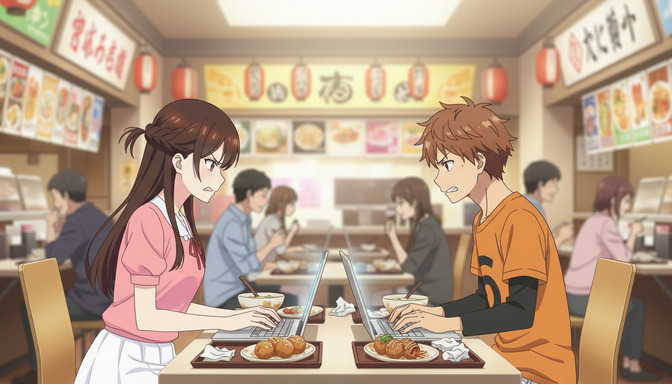
Think of it as the difference between telling a director "film two people at a ramen shop" versus "medium shot, warm practical lighting from paper lanterns, slice-of-life art style, building tension and frustration, both characters leaning forward, the restaurant crowded and loud behind them." Same location, completely different scene.
Layer 1: Subject — anchor your character before anything else.
Subject is the first layer because every other layer is built around it. Define who is in the frame: their distinguishing visual traits (hair color and style, clothing, build), their identity (a detective, a student, a warrior), and any relationship implied by their physical positioning ("standing apart," "leaning toward each other," "back-to-back"). If multiple characters are present, name both and establish their spatial relationship.
The subject layer isn't a full character biography. It's the three to five visual facts the model needs to know who it's placing in the frame. If you've built a character in AutoWeeb, their visual details are already saved — your subject layer can focus on positioning and relationship rather than restating hair and eye color from scratch.
Strong subject layer: a sharp-eyed detective in a rumpled trench coat and a young assistant in a school uniform sitting across from each other at a narrow ramen counter, the detective's arms crossed, the assistant's laptop open between them.
Layer 2: Composition — tell the model where to put the camera.
Composition is the most commonly skipped layer, and skipping it is what produces medium shots when you wanted a wide establishing frame, or a static frontal shot when you wanted a dynamic low angle. The model defaults to its most-trained framing when you don't specify. Name the shot type and camera angle explicitly, and name them early in the prompt, ideally in the opening phrase.
Shot type instructions that work: "medium shot," "long shot," "close-up," "over-the-shoulder," "two-shot." Camera angle instructions that work: "low angle," "eye level," "bird's-eye view," "Dutch tilt." Pair a shot type with an angle for a complete compositional instruction. For composition techniques like placing subjects at visual intersections or using the frame's horizontal axis deliberately, the guide on the rule of thirds in AI anime composition covers that structure in full.
Composition layer added: medium shot, slightly low angle looking up at the two characters, both faces visible, the ramen counter and laptop filling the lower third of the frame.
Layer 3: Lighting — shape what the scene feels like before any emotion word is used.
Lighting in anime isn't just illumination. It's emotional positioning. Warm practical light from paper lanterns in a busy restaurant implies comfort and proximity. Cold overhead fluorescents in a school hallway imply institutional pressure and exposure. Blue-tinted window light at night implies loneliness, even before anyone looks sad. Choosing the light source, its color temperature, and its direction is choosing the emotional register of the scene before you've written a single mood word.
Name the light source first (sunlight, paper lanterns, neon signs, moonlight, overhead fluorescents, a phone screen, firelight), then add color temperature ("warm amber," "cold blue-white," "pale gold") and direction ("rim lighting from the left," "light falling from above," "backlit against the window"). For dramatic scenes, add whether there are shadows and where they fall. The model responds to this combination as a tonal instruction, not just a visual one.
Lighting layer added: warm amber practical lighting from overhead paper lanterns, light falling softly on the characters' faces and shoulders, the counter's surface catching the glow, the background figures slightly underlit and indistinct.
Layer 4: Style — activate the aesthetic register intentionally.
Without a style instruction, the model produces a general anime aesthetic, which means high-fidelity eyes, clean linework, and a color palette that sits between "modern shonen" and "contemporary slice of life." That's not wrong, but it's not directed. Style layer instructions shift the model into a specific visual register: the soft painterly depth of a Ghibli-influenced scene, the high-contrast linework and flame textures of a Demon Slayer fight, the warm domestic palette of a slice-of-life school drama, or the cyberpunk neon saturation of an urban dystopia.
Style instructions work best when they name both the aesthetic family ("slice-of-life anime") and a specific quality within it ("warm desaturated palette," "clean linework with soft shading," "hand-drawn background texture"). The first tells the model what canon it's operating in. The second tells it which version of that canon applies to this specific scene.
Style layer added: slice-of-life anime style, warm desaturated palette, clean expressive linework, soft cel shading on the faces, background rendered with light detail blur to keep focus on the foreground characters.
Layer 5: Mood — name the emotional state of the scene, not just the characters.
Mood is distinct from emotion. Emotion is what the characters feel. Mood is what the scene feels like to watch. A scene can have two angry characters in a warm cozy restaurant, and the mood can still be "building confrontation in an intimate space" rather than "open hostility." Naming the mood gives the model a directive for how to weight every other element: the lighting stays warm but the posture goes tense, the background stays busy but the characters' attention narrows.
Effective mood instructions name the feeling the viewer experiences, not just the characters' internal state: "the weight of an unspoken disagreement," "quiet intensity before a decision is made," "the specific discomfort of two people who know each other too well to pretend," "the suspended moment just before something changes." The model parses these as compositional and tonal instructions that govern expression, posture, spacing, and shadow weight.
Mood layer added: mood of quiet confrontation, both characters fully controlled but clearly in a standoff, the energy between them tight without spilling into open anger.
Layer 6: Motion — tell the model what's moving and how.
Motion is often treated as optional, but it does two jobs simultaneously: it adds visual energy to still images and it defines what happens in video prompts. For still images, motion can be implied through posture, gesture, secondary elements (steam rising from a ramen bowl, a character leaning forward mid-sentence, a strand of hair across the face), or explicit action (a hand slamming a table, chopsticks set down with deliberate force). For Seedance 2 video prompts, motion is a primary instruction: what the camera does, what the characters do, and what secondary elements move in the background.
Motion instructions that work for still images: "one character leaning forward across the counter, hands flat on the surface," "steam curling upward from the soup bowls between them," "the background filled with the small constant movement of other diners." For video: "slow push-in from medium to close-up over the exchange," "characters' hands and expressions moving but posture staying controlled," "background extras moving naturally, slightly out of focus."
Motion layer added: the detective leaning back with arms crossed, the assistant leaning forward slightly, steam rising slowly from the untouched bowls between them, background diners in soft continuous movement.
Layer 7: Environment — build the world as context, not backdrop.
Environment is the last layer to write but never the least important. The setting isn't decoration. It contextualizes every other layer: why the characters are here, what kind of world they inhabit, what the stakes of this particular moment are. A ramen counter in a busy evening restaurant implies urgency, necessity, and the kind of conversation that happens in public because someone doesn't want to have it somewhere private. Naming the environment with that level of specificity makes the model treat it as narrative, not set dressing.
Build the environment with at least three spatial layers: what the characters are physically in contact with (the counter, the chairs), what surrounds them at their level (other diners, menu boards, the kitchen pass-through), and what fills the upper frame and background (hanging lanterns, banner signs, the restaurant's depth stretching back). Name the time of day, the ambient conditions ("the kitchen noise coming through in the background," "the restaurant at evening rush, nearly every seat taken"), and any environmental detail that reinforces the scene's mood.
Environment layer added: a busy ramen restaurant at evening rush, the counter narrow and close, colorful hand-painted menu boards and paper lanterns overhead, the kitchen visible through a low pass-through behind the counter, the background seats filled with other diners, the ambient noise of a crowded place implied in the scene's density.
The complete formula in one prompt.
Assembled in order, the seven layers produce a prompt like this:
Medium shot, slightly low angle, of a sharp-eyed detective in a rumpled trench coat and a young assistant in a school uniform sitting across from each other at a narrow ramen counter, the assistant's laptop open between them, warm amber light from overhead paper lanterns falling softly on both faces, slice-of-life anime style with a warm desaturated palette and clean expressive linework, mood of quiet confrontation — both characters controlled but clearly in a standoff, the detective leaning back with arms crossed and the assistant leaning forward with hands flat on the counter, steam rising slowly from untouched soup bowls, a busy ramen restaurant at evening rush behind them, colorful menu boards and paper lanterns overhead, the background dense with other diners.
Every layer earns its place. Remove the shot type and the model defaults to an arbitrary frame. Remove the lighting and the warmth of the setting undermines the confrontation. Remove the style and the aesthetic becomes generic. Remove the mood and the postures become decoration rather than story. The formula works because each layer constrains a specific type of ambiguity. Together they leave the model very little room to guess.
Use AutoWeeb's prompt analysis to catch missing layers before you generate.
Writing a seven-layer prompt and catching your own gaps is harder than it sounds. The layer you forget is usually the one that feels most obvious in your head — which means you've already accounted for it mentally without putting it in the prompt. AutoWeeb's prompt analysis runs your prompt against the full formula and identifies which layers are present, which are missing, and specifically where the model is being left to infer rather than instructed.
For the formula above, the analysis would flag a prompt like two characters at a ramen shop, tense atmosphere, slice-of-life style for missing: shot type and camera angle (Composition), light source and direction (Lighting), a specific mood articulation beyond the word "tense" (Mood), any motion instruction (Motion), and a spatially built environment rather than a named location (Environment). Each flag comes with a reason: not a generic "add more detail," but a specific statement of what the missing instruction causes the model to default to.
For Seedance 2 video prompts, the analysis adds a motion-consistency check: does the described camera movement work across the full duration of the clip, or does it create a framing conflict with other elements as the shot progresses? A slow push-in from medium to close-up works perfectly unless the prompt also asks for a character who stands up mid-clip. Those two instructions conflict. The analysis catches the conflict before generation so you're not regenerating the same broken clip trying to figure out why the framing broke.
The most valuable thing the analysis does isn't catching errors. It's making the formula explicit. Once you've seen what a complete seven-layer prompt looks like annotated, you start writing them that way from the start — and your first generation attempts stop looking like a starting point and start looking like the scene you had in mind.
👉 Start Building Layered AI Anime Prompts on AutoWeebFrequently asked questions about the AI anime prompt formula.
What is the AI anime prompt formula?
The AI anime prompt formula is a seven-layer structure for writing anime generation prompts: Subject (who is in the frame), Composition (shot type and camera angle), Lighting (light source, color temperature, and direction), Style (aesthetic register and visual family), Mood (the emotional state the scene projects), Motion (what is moving and how), and Environment (the spatial world around the character). Each layer addresses a distinct visual dimension. Together they leave the AI model very little ambiguity to fill with defaults, which is why prompts built on this formula produce more consistent, directed results than single-pass descriptions.
Do I need to include all seven layers in every prompt?
No, but every layer you leave out becomes a decision the model makes without your direction. Some omissions are low-stakes: if you don't specify motion in a still image prompt, the model will imply a plausible amount of stillness or light movement and it's rarely wrong. Others are high-stakes: omitting Composition means the model picks a framing from its default distribution, which for a character description is almost always a medium shot regardless of what you imagined. Omitting Lighting means the model applies its most common training setup, which is usually bright and even, even when your scene calls for something dramatically different. As a rule, specify any layer where getting it wrong would require a full regeneration.
What is the difference between Mood and Style in this formula?
Style is the aesthetic vocabulary the scene is drawn in: the visual family, the linework quality, the color palette approach, the shading technique. Mood is the emotional register of the scene: what the viewer feels watching it, what the characters' situation communicates, what the scene is "about" emotionally. A slice-of-life style can carry a mood of "warm domestic contentment" or a mood of "quiet grief in familiar surroundings." The style governs how the image looks. The mood governs what it means. Both need to be named because a style instruction without a mood instruction often produces the style's most generic emotional default, and vice versa.
How long should an anime prompt be?
Long enough to address all seven layers with clarity, and not a word longer. The target is efficient coverage, not exhaustive description. Each layer needs one to three pieces of specific information: a shot type, a light source, an aesthetic family plus one quality modifier, a mood in concrete terms, a motion verb or two, and three to five spatial anchors for the environment. A complete seven-layer prompt can easily fit in two to four sentences. Longer prompts aren't better prompts. Prompts with fewer gaps are better prompts.
What order should the seven layers be written in?
The formula order — Subject, Composition, Lighting, Style, Mood, Motion, Environment — is the recommended sequence because it moves from the most structurally fundamental instruction (who is in the frame) to the most contextual one (what world they inhabit). The model weights the opening phrases of a prompt more heavily for compositional decisions, so placing shot type and framing early in the prompt produces more consistent framing results than burying the camera instruction after the character description. That said, the layers don't need to appear as labeled sections. A single fluent sentence that covers all seven in order works as well as seven separate clauses, as long as the information is present.
Does the prompt formula work for Seedance 2 video prompts?
Yes, with one addition: the Motion layer becomes more important than it is in still image prompts. For video, Motion needs to address both character action and camera movement explicitly, and it needs to be specific enough that the model can sustain it across the clip's full duration. A motion instruction like "the camera slowly pushes in as the character turns" works. A motion instruction like "dynamic movement" does not — the model will interpret "dynamic" differently at different points in the clip. Pair specific character action with specific camera behavior, and add a consistency constraint if needed: "the character's full figure remaining in frame throughout the push-in." AutoWeeb's prompt analysis checks for motion-framing conflicts in video prompts specifically, which makes it particularly useful for Seedance 2 work.
How does AutoWeeb's prompt analysis use the seven-layer formula?
AutoWeeb's prompt analysis evaluates your prompt against the complete formula and identifies which layers are structurally present, which are partially addressed, and which are missing entirely. For each missing or incomplete layer, it tells you specifically what the model will default to in the absence of that instruction — so you understand what you're leaving to chance rather than just being told to add more detail. For video prompts, the analysis adds motion and framing consistency checks on top of the standard seven-layer review. The result is a prompt audit, not a rewrite: the analysis maps the gaps and explains them, and you decide how to fill them.
Can I use this formula for anime character design prompts, not just scene prompts?
The formula adapts to character design prompts with some layer shifts. Subject stays the same and becomes the most detailed layer in a character design context. Composition governs the character sheet format (full-body turnaround, expression sheet, action pose). Lighting remains relevant for how the character's palette and shading are rendered. Style is critical for which anime aesthetic family the design belongs to. Mood translates into the character's design register: stoic and angular versus warm and open versus sharp and threatening. Motion can address a pose or the implied energy in a character's stance. Environment becomes the context around the character, which for a design sheet might be a neutral background with a specific surface texture rather than a full built scene.
The formula gives you the full vocabulary for building scenes that look directed rather than generated. For the specific layers that govern how a camera is positioned and angled, the guides on low angle shots and close-up shots go deep on the Composition layer with shot-specific prompting structure. For the motion layer in video work, the guide on motion blur lines in AI anime covers how movement instructions translate into visual energy on screen.