
Extend Video with Seedance 2.0
Lengthen any anime clip from your library with Seedance 2.0 Mini. Pick a saved video, describe what happens next, and generate a seamless extension that keeps the same character, lighting, and art style.
Make Short Clips Longer Without Reshooting
Video extension on AutoWeeb continues the motion from your last frame instead of starting over from a still image.
Seedance 2.0 Mini reads the ending of your saved clip and generates the next few seconds from a short text prompt. The character, outfit, camera angle, and lighting carry forward so the new footage feels like one continuous take.
Use Extend Video when a storyboard beat needs one more action, when a YouTube hook needs extra runway, or when you want to chain library clips into a longer scene without re-prompting from scratch.
Watch the full walkthrough for picking a clip from your library, writing a prompt for what happens next, and stitching the extended footage into one scene with Seedance 2.0 Mini.
How to Extend a Video with Seedance 2.0
Start from any video you already generated in AutoWeeb. The Extend Video workflow loads that clip as the start frame, so you only describe what should happen after the current ending.
Most extensions run in about four seconds. Write one clear action, generate, review, and extend again if you need a longer sequence.
-
 1
1Extend any video from your library
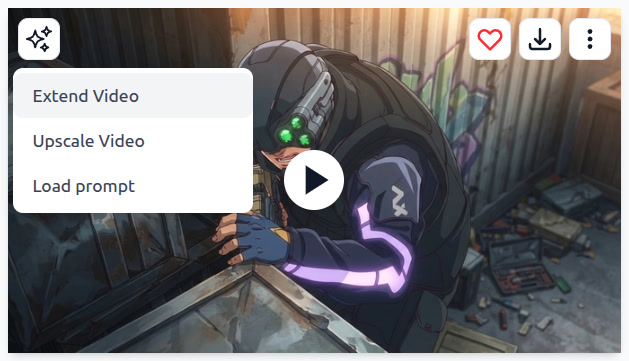
Open a saved clip, open the AI menu in the top left, and choose Extend Video. AutoWeeb attaches that file as the Start frame for the next generation.
-
 2
2Write a simple prompt for what happens next
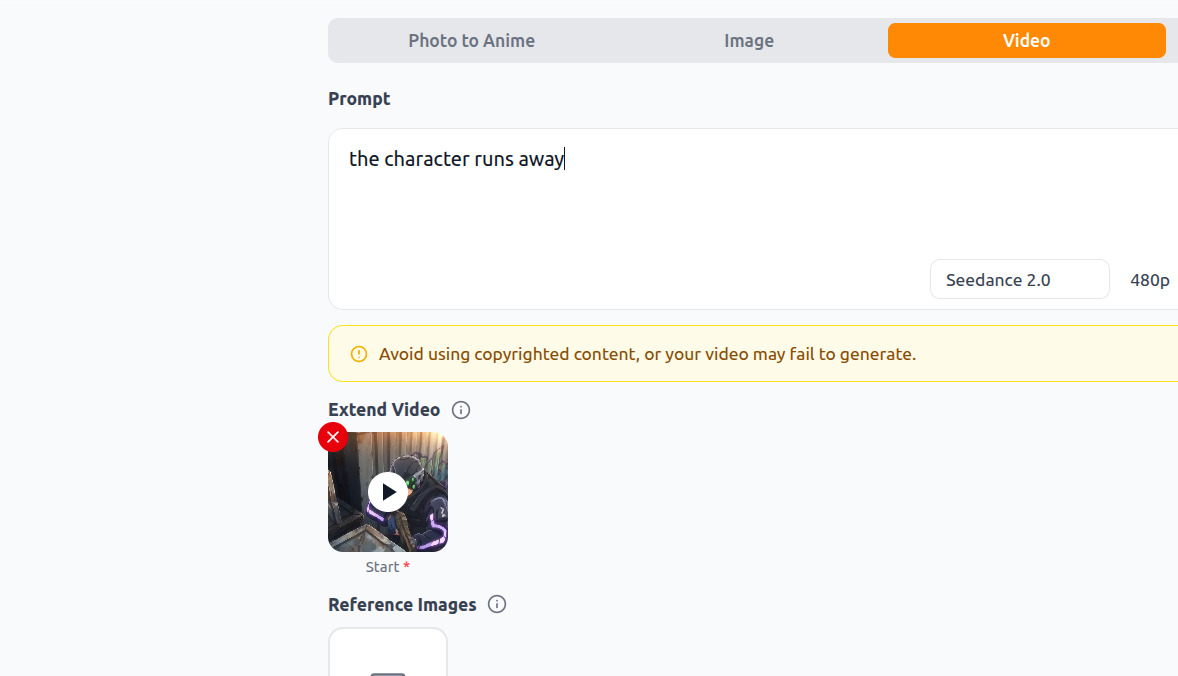
Describe the next beat in plain language. A prompt like "the character runs away" is enough. Seedance 2.0 Mini continues the motion from the last frame of your original clip.
-
3
Original video
This is the clip you started from: a tactical character crouching in an alley before the extension runs. The ending pose becomes the anchor for the new footage.
-
4
Extended video
Seedance 2.0 generates the next seconds from your prompt. The character keeps the same suit, goggles, and alley lighting while the new action plays out.
-
5
Combined video
AutoWeeb stitches the original and extended clips into one file you can download, share, or extend again for an even longer sequence.
Original, Extended, and Combined
Compare the three outputs side by side. The original clip sets the scene, the extension adds the next action, and the combined file is ready to publish or chain into your next beat.
Explore Anime Video Creation
Guides, genres, and tools for making anime videos with AI.
Image to Video
Turn anime stills into animated clips with consistent characters.
Seedance 2 Anime
Animate scenes with Seedance 2 tuned for anime motion.
Gemini Omni Flash Anime
Google's multimodal video model for scene cuts, sports motion, and flexible image tagging.
Fighting Videos
Sword fights, action beats, and cinematic combat clips.
Mecha Anime
Military pilots, mech character sheets, and cockpit-to-combat action sequences.
Basketball Videos
Court drama, training montages, and game-winning shots.
Sports Videos
Hockey, soccer, tennis, and full sports anime series.
Magic Videos
Spell charges, fantasy effects, and atmospheric magic scenes.
Romance Videos
Emotional beats, confessions, and slice-of-life romance.
Anime Shorts
Turn a premise into a complete short in minutes.
Anime Episodes
Plan, storyboard, and animate a full episode.
Make an Anime
The full studio workflow from character to final video.
Anime Series
Build recurring characters and a season arc.
Prompting Guide
Write cinematic prompts that match your vision and stop wasting credits.
YouTube Videos
Shorts beats, episode backlogs, and long-form chapter compiles.
Isekai World Building
Design fantasy worlds, reusable locations, and cinematic isekai scenes.
AI Anime Prompt Agent
Turn rough ideas into cinematic Seedance 2 video prompts with the AI Director.
Donghua with AI
Pick Link Click-style art, design character sheets, and animate modern Chinese animation scenes.
AI Anime Video Generator
Create anime videos with AI. Explore genres, tools, and production guides.
Frequently Asked Questions
What is Extend Video in AutoWeeb?
Extend Video lets you continue a saved anime clip with Seedance 2.0 Mini. You pick a video from your library, write a short prompt for what happens next, and AutoWeeb generates new footage that starts from the last frame of your original clip.
Which model powers video extension?
AutoWeeb uses Seedance 2.0 Mini for Extend Video. It is tuned for short anime motion beats and keeps character design, lighting, and camera framing consistent with the clip you selected.
Can I extend a video more than once?
Yes. After each extension you can run Extend Video again on the combined result or on the newest clip in your library. Chain multiple four-second extensions to build longer scenes and episode sequences.
Do I need a new image to extend a video?
No. The workflow uses your existing video as the start frame. You only need a short text prompt describing the next action, such as a run, turn, jump, or camera push.
How is Extend Video different from image to video?
Image to video animates a still frame from scratch. Extend Video continues motion from the end of an existing clip, so poses, timing, and scene context already match the footage you are lengthening.
Ready to Extend Your Anime Videos?
Open any saved clip, describe the next beat, and let Seedance 2.0 Mini add seamless footage to your library.
Extend a Video FreeNo credit card required • Free to try