
How to Create Cinematic AI Anime Videos That Look Professional (Not Cheap AI Animation)
The gap between amateur AI animation and cinematic anime video is not the tool. It is every decision made before you press generate.
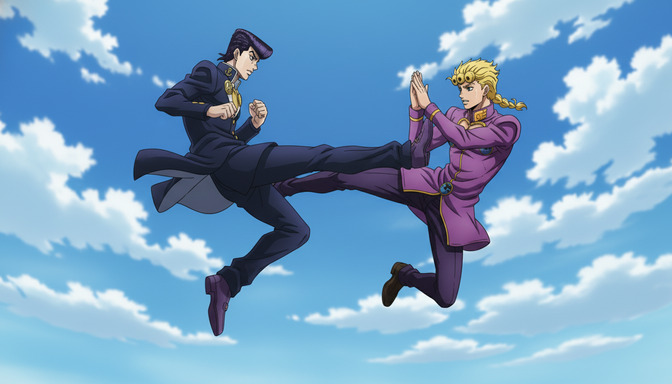
Two creators use the same AI video model. One produces something that looks like a wobbling character pasted over a shifting gradient. The other produces something that looks like a scene cut from a real anime series: deliberate motion, cinematic framing, emotional weight in every second. The model is identical. The difference is everything that happened before the generation ran.
Cinematic AI anime video is not a lucky output. It is the result of strong source images, consistent characters, specific camera language, and a working understanding of how shots are composed to tell stories. This guide covers each of those elements in sequence, with concrete prompt examples and the most common mistakes to avoid.
Why some AI anime videos look amateur and others look cinematic
Amateur AI animation has a specific look. Characters drift rather than move with purpose. The camera either stays perfectly locked or shakes in a way that feels random rather than intentional. Backgrounds warp and breathe independently of the characters on top of them. Faces lose their features mid-clip. The motion feels like something is being pushed through a blender rather than guided by a director.
Cinematic AI anime video avoids these problems not by using a better model, but by giving the model better inputs. The source image is clean, well-lit, and compositionally intentional. The character has been established with enough visual consistency that the model knows what it is working with. The motion prompt describes a specific, directed camera or character movement rather than a vague directive like "look cool." Every element of the prompt is doing work.
Professional-looking AI animation also tends to work with the model rather than against it. Short, decisive movements animate more cleanly than complex multi-part actions. Environmental motion, wind through hair, a leaf falling, a cloak catching the air, tends to stay stable while adding visual life. Directors of actual anime know that stillness is not dead time. A held shot with subtle environmental motion and the right music carries enormous weight. The same principle applies to AI video.
The source image is everything
Every AI anime video begins as an image. That image is not just a starting frame. It is the foundation the model uses to understand the character, the lighting, the setting, and the spatial relationships between elements. A weak source image produces a weak video. There is no prompting language that compensates for a noisy, poorly lit, or compositionally unclear input.
A strong source image for AI video has four characteristics. First, the character is clearly defined: distinct features, clean linework, no visual noise around the edges. Second, the lighting is deliberate: there is a visible light source, the shadows fall with direction, and the color palette is unified rather than flat. Third, the composition is intentional: the character is placed in the frame with purpose, there is foreground, midground, and background separation, and the overall image has depth. Fourth, the pose is specific: the character is doing something, not just standing.
Weak image vs. strong image
Weak source image: a character centered in frame, neutral standing pose, flat ambient lighting, no background depth, uniform color temperature throughout.
Strong source image: a character positioned at a slight three-quarter angle, leaning forward with weight in the leading foot, dramatic side lighting from the upper left casting a clear shadow across the right side of the face, a blurred background with warm bokeh suggesting depth, a color palette with cool blues in shadow and warm amber in highlight.
The strong image gives the model a complete visual brief. The character knows where light comes from. The spatial environment has dimension. When motion is applied, the lighting can be animated consistently rather than invented randomly.
Character consistency before you animate
Character consistency is the most common failure point in AI anime video workflows. A character is generated once, looks strong in the source image, and then visibly drifts during animation: the hair color shifts, the eye shape changes, the proportions stretch. The result looks less like an anime scene and more like a visual glitch.
The fix is to build character consistency into the image generation step, before you ever touch video generation. This means having a character sheet: a fixed written description of the character that travels with every generation. Hair color as a specific named shade, not "dark hair" but "deep indigo-black hair with navy highlights." Eye color, exact. Clothing details written as precise visual facts, not impressions.
When your character has a consistent written description, the video model has stable reference material to work from. The drift still happens at the margins, but it is far less severe than when the model is guessing at a character from a single ambiguous image.
For more on building character sheets that hold across multiple scenes, the guide on creating multi-character anime scenes using character sheets goes deep on the process.
Camera movement instructions that actually work
Generic movement prompts produce generic results. "Move dramatically" tells the model nothing. "The camera slowly pushes in from mid-shot to close-up on the character's face as wind moves through their hair" tells it exactly what to do, and why.
Every camera movement in real filmmaking has a name and a purpose. The same vocabulary translates directly into AI video prompts.
- Slow push-in: building tension or emotional intimacy. Best for moments of decision or revelation.
- Pull-back reveal: expanding the world around the character. Best for establishing scale or loneliness.
- Low-angle upward tilt: conveying power, menace, or awe. Best for antagonist appearances or dramatic arrivals.
- Orbit or arc shot: rotating around a static subject to convey gravity or importance. Best for charged standoffs.
- Handheld drift: a subtle, naturalistic camera sway. Best for intimate or documentary-feeling slice-of-life scenes.
Generic movement vs. cinematic movement
Generic movement prompt: anime girl standing in the rain, moving dramatically, emotional scene.
Cinematic movement prompt: anime girl in a dark navy school uniform standing alone in heavy rain, camera begins at low angle looking up at her face, slowly tilting upward and pulling back to reveal the empty street behind her, rain catching the sodium orange light of a streetlamp overhead, her expression fixed and unreadable, slow motion on the falling rain, no character movement — only camera and environment.
The cinematic prompt specifies the camera axis, the movement direction, the environmental detail, the light source, what is moving and what is not, and the emotional register of the scene. It is a complete brief. The generic prompt is a starting point that the model fills in with averages.
How shot composition affects video quality
Shot composition is the arrangement of elements in the frame. In still images, composition affects how the eye moves through a scene. In video, it affects how motion reads: whether a camera push feels purposeful, whether a character's action reads with clarity, whether the environment supports or competes with the subject.
The most reliable compositional tools for AI anime video are the rule of thirds (placing the subject off-center to create tension and balance), leading lines (environmental elements like roads, corridors, or sightlines that direct the eye toward the subject), and depth layering (distinct foreground, midground, and background elements that create spatial dimension).
When prompting for composition, describe where the character sits in the frame relative to environmental elements, not just where they are in the scene. "The character stands in the lower left third of the frame, with a long corridor stretching toward the vanishing point in the upper right" is compositional direction. "The character stands in a corridor" is not.
Lighting, mood, atmosphere, and depth
Lighting is the single most powerful tool available for transforming an AI anime video from flat to cinematic. The same character, same setting, and same camera movement will produce entirely different emotional registers depending on the light.
Cinematic anime uses light to carry narrative information. A scene bathed in warm amber suggests safety, nostalgia, or intimacy. Cold blue-white light signals isolation, threat, or unresolved tension. High-contrast chiaroscuro, bright key light against deep shadow, signals drama and psychological weight. Soft diffused lighting with no strong shadows signals vulnerability or tenderness.
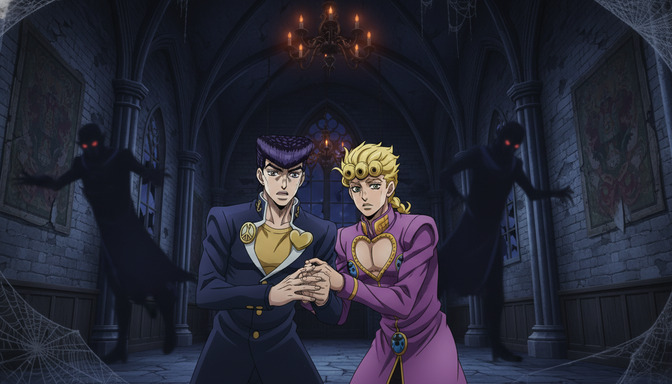
Prompt example for a dramatic confrontation: two anime characters facing each other in a wide stone corridor, single overhead spotlight casting a tight circle of cold white light that falls between them rather than on either figure, both characters partially in shadow, only their eyes and the edges of their silhouettes visible, deep darkness surrounding the lit area, no environmental color bleed, tension without movement.
Atmosphere is created through layering: particle effects like dust, rain, or embers in the air; fog or haze in the background that reduces contrast at depth; environmental elements like candles, lanterns, or neon that introduce warm sources against a cool ambient light. These layers give the AI a rich environment to animate into rather than a flat background to hold static.
Common mistakes that create low-quality AI animation
Starting with a weak source image. No amount of prompt sophistication compensates for a flat, poorly composed, or visually noisy source image. Fix the input first.
Prompting for too much motion. AI video models produce cleaner results when asked to do one clear thing rather than several overlapping things. A prompt that asks a character to run, spin, look back, draw a sword, and land in a battle stance in five seconds will produce visual chaos. Choose one movement, execute it clearly, and cut.
Ignoring the background. A character that moves well over a background that warps, pulses, or dissolves looks like bad compositing. Keep background motion subtle and separate from character motion. Still backgrounds with environmental texture, leaves in wind, water ripples, distant crowd movement, perform more reliably than backgrounds with their own dramatic animation.
Using vague emotional descriptors instead of visual language. "Sad," "intense," and "powerful" are states, not visual instructions. Translate them into something the model can render: "eyes downcast with the brow slightly furrowed," "jaw set, gaze fixed at a point off-screen," "posture fully upright with no visible tension in the shoulders."
Skipping the storyboard step. Generating videos without a plan for how they connect means every clip is a standalone experiment. Some will be good. None of them will add up to something that feels like a scene.
How to storyboard scenes before generating videos
Storyboarding for AI anime video does not require drawing ability. It requires knowing, before you generate anything, what each clip is supposed to do within the scene. A storyboard is just a sequence plan: shot 1 establishes the location, shot 2 introduces the character, shot 3 shows the action, shot 4 holds on a reaction. Each shot has a purpose, and each purpose informs the generation prompt for that clip.
Write your storyboard as a numbered list of shot descriptions before you generate anything. Each entry should include the shot type (wide, medium, close-up), the subject and what they are doing, the camera movement if any, and the emotional beat the shot is carrying. That document becomes your prompt source. You generate each clip with its shot description in hand, and the clips connect because they were planned to connect.
For AI anime specifically, plan your clips in groups of two or three that share a location and lighting setup. Switching settings mid-scene costs you visual coherence. Staying in a single environment across multiple shots, and varying the camera angle and shot size instead, produces a more cohesive sequence that reads as a scene rather than a collection of separate generations.
The guide on generating story ideas with AI before building your anime storyboard walks through the full pre-production process, from concept to scene structure.
How cinematic directors think about visual storytelling
Directors of anime series approach every scene with a question: what does the viewer need to feel at the end of this sequence that they did not feel at the beginning? Every shot choice, every piece of lighting direction, every camera movement is an answer to that question.
This is different from the way most AI creators approach video generation, which is shot by shot with no connecting logic. Cinematic thinking is cumulative. A slow push-in on a character's face builds tension. A sudden cut to a wide shot releases it. A lingering hold on an empty space after a character leaves it communicates absence. The individual shots are not the product. The emotional arc across the sequence is.
To think like a director, start with the emotional destination of the scene and work backward. If the scene ends with a character making a decision, every shot before that moment should be doing something to build toward it: contracting space, isolating the character, increasing the contrast of the lighting. If the scene ends with a reunion, the shots before it should be doing the opposite: expanding from tight to wide, warming the light, introducing another character's presence at the edge of the frame before the full reveal.
Prompt example for a building-tension sequence: Shot 1: wide shot, anime boy standing alone at the entrance of a long hallway, camera static, cool blue overhead fluorescent light, symmetrical framing. Shot 2: medium shot, same boy, camera slowly pushing in from his waist to his chest, his fists visible at his sides, slightly clenched. Shot 3: close-up on his eyes, camera static, a flicker of shadow crosses his face as the light above sways slightly, his gaze fixed forward.
Three shots, one emotion, one direction of travel. That is directorial thinking.
How AutoWeeb helps you create cinematic anime stories
AutoWeeb is built around the full creative pipeline that cinematic AI anime video requires. You start with a character: designed, described, and stored so that every image you generate from it carries consistent identity. The AutoWeeb anime character creator gives you a character sheet that travels with your productions.
From there, AutoWeeb's story agent helps you build the narrative scaffolding before you generate a single frame of video. Scene structure, emotional beats, shot-by-shot breakdowns. The work that separates a cinematic sequence from a collection of random clips happens at this stage, and AutoWeeb makes it accessible to creators at every experience level.
When you move into image and video generation, the consistency tools carry your character's visual identity across every scene. You are not regenerating from scratch each time. You are working from a stable foundation that gets stronger the more you use it. The result is that your final videos look like episodes, not experiments.
For related reading on getting your images video-ready before generating, the guide on 5 signs your AI anime image is ready to turn into video covers the quality checklist to run before you animate.
Frequently asked questions
What makes AI anime video look cheap or amateurish?
The most common causes are a weak source image with flat lighting or no compositional depth, vague motion prompts that produce generic or unstable movement, character drift where the model loses track of the character's visual identity across frames, and background warping that is not consistent with the character's motion. Fixing the source image and writing specific directional prompts addresses the majority of these issues.
Do I need to storyboard every single video I make?
For a single standalone clip, you do not. For anything that is supposed to work as a sequence of two or more shots, a basic shot list is essential. Without it, the clips will not connect visually or emotionally, and you will spend credits regenerating clips until they accidentally match rather than deliberately do so.
What camera movements animate most reliably in AI anime video?
Slow push-ins, gentle pull-backs, and subtle handheld drifts are the most consistently reliable. Orbit or arc shots can work but require a stable, well-defined subject. Rapid camera movements and complex multi-axis moves tend to produce visual instability. When in doubt, slow and deliberate outperforms fast and dramatic in AI video generation.
How do I keep my character looking the same across multiple video clips?
Write and use a character sheet: a fixed written description of every visual attribute. Use the same source image or a closely matched one across clips in the same scene. Avoid generating character images from scratch between clips in the same sequence. The more visual reference material the model has to anchor to, the less the character will drift. AutoWeeb's character tools are built specifically for this kind of cross-scene consistency.
How long should each AI anime video clip be?
Shorter is almost always better. A 3 to 5 second clip with a clear, single purpose holds its quality more reliably than a 10 second clip trying to do multiple things. Real anime is cut faster than most people realize. Work with short clips, plan your cuts deliberately, and assemble them into sequences rather than asking a single generation to carry the full weight of a scene.
Can I use AutoWeeb if I have no experience with AI video generation?
Yes. AutoWeeb is designed for beginner and intermediate creators. The story agent walks you through scene building, the character creator handles identity consistency, and the prompting tools guide you toward the specific language that produces quality results. You do not need to come in knowing how to write video prompts. The platform teaches the workflow as you use it.
What is the most important thing to get right before generating any AI anime video?
The source image. Everything else can be adjusted through better prompting, better shot planning, and better motion direction. A bad source image cannot be fixed after the fact. Invest the time in generating a strong, well-lit, compositionally intentional image with a character whose identity is clearly established. That image is the foundation every downstream generation decision will rest on.
Related Blog Posts
How to Use Poses to Make Your AI Anime Characters Feel Alive
A character standing still in every scene is not a character. It is a placeholder. Posing is what turns a design into a person.
Learn how to use poses in AI anime art to express emotion, drive action, and tell stories. Covers body language, action poses, romantic poses, group compositions, camera angles, and common mistakes.
5 Signs Your AI Anime Image Is Ready to Turn Into Video
Not every image that looks good as a still will animate cleanly. Here is what to check before you run it through your image-to-video model.
Learn the 5 signs that your AI anime image is ready for video generation. Check character consistency, clean anatomy, visible hands, facial expressions, composition, and background quality before animating.
How to Create Multi-Character Anime Scenes Using Character Sheets
Character sheets are the difference between a cast that stays consistent across every scene and characters that look like strangers to each other.
Learn how to use character sheets to generate consistent multi-character anime scenes with AI. Covers reference images, character descriptions, group shots, and common mistakes.
How to Write Better AI Anime Image Prompts for Consistent Results
The gap between a vague output and a character that looks the same every time almost always lives in how the prompt was written.
Learn how to write AI anime image prompts that get consistent results. Character descriptions, lighting, camera angles, art styles, and before-and-after examples for beginners.
Explore AutoWeeb
Jump into the tool that fits your creative step.
AI Anime Video Generator
Animate storyboard shots into cinematic clips with Seedance 2 and consistent characters.
Anime Character Creator
Design original characters with consistent sheets across every scene.
AI Anime Image Generator
Generate cinematic anime stills anchored to your character library.
Turn Photo Into Anime
Upload any photo and watch AI turn it into stunning anime art in seconds.
AI Anime Location Generator
Create a location set once, then generate reference images from every angle.
AI Anime Storyboarding
Describe your idea, pick your characters, and let AI draft the script and scenes.
AI Anime Prompt Agent
Turn a rough idea into a cinematic Seedance 2 prompt with the AI Director.