
How to Create Anime Videos Like Kalshi's World Cup Shorts
A complete production workflow for creating viral sports anime shorts: design your characters, script and storyboard with AutoWeeb's AI Agent, build locations, dress a full cast, @tag every asset in each shot, and generate anime images and video.
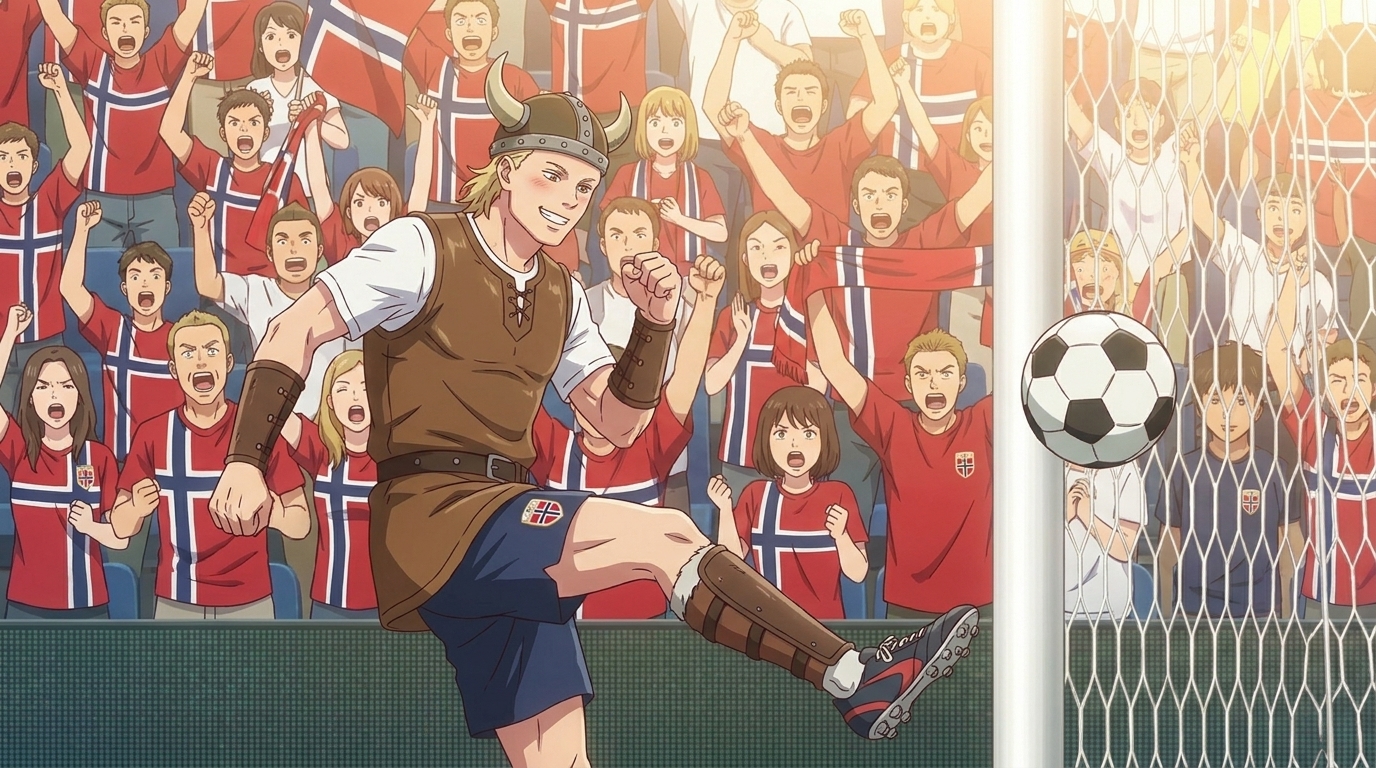
Kalshi did not hire an animation studio. They took the World Cup, the most emotionally loaded sports event on the planet, and reframed every match moment through the visual grammar of shounen anime: the underdog striker with everything on the line, the goalkeeper who has trained for this exact instant for years, the stadium crowd rendered in that specific way anime crowds are rendered, faces visible in the front rows, a sea of color and motion behind them. The result was a series of shorts that spread across Twitter, TikTok, and Reddit not because they had a marketing budget but because they understood two things simultaneously: sports fans feel things like anime protagonists feel things, and anime fans already know how to root for someone they have never met.
This guide covers the full AutoWeeb production workflow for replicating that approach: creating a main character from scratch, using AutoWeeb's AI Agent to write the script and storyboard, building locations and a full supporting cast with outfit variations, @tagging every saved asset in each storyboard shot so the AI draws from exact references, generating the images, and animating the key scenes into video. The same pipeline works for any World Cup matchup, any national team, any tournament moment you want to turn into an original anime short.
Why Shounen Sports Anime and Real Tournaments Are a Viral Formula
Blue Lock, Haikyuu!!, Slam Dunk, Captain Tsubasa. Every dominant shounen sports series runs on the same emotional architecture: a protagonist with singular drive, a rival who makes them better, a team that has to become something more than a collection of skilled individuals, and a tournament structure that creates escalating stakes across every match. That architecture maps directly onto the World Cup. The tournament format, the group stage eliminations, the knockout rounds, the possibility of a 90th-minute goal that ends a nation's campaign or extends it for another week: it is a sixteen-episode arc compressed into a month, with the entire world watching.
Kalshi's insight was that you do not have to invent the stakes. The stakes exist. The real players have real histories, real rivalries, real pressure. What anime adds is the interior life: the close-up before the penalty kick, the flashback to the training camp, the moment a character's expression shifts from uncertainty to resolution. Real sports broadcasts do not have time for that. Anime is built for it. The combination makes content that functions as both sports commentary and entertainment, which is why it performs across audiences who would not normally overlap.
The production principle that makes this work in AutoWeeb is consistency. The protagonist has to look like the same person in the locker room, on the pitch, and in the slow-motion goal sequence. The stadium has to feel like the same stadium across five different camera angles. That consistency is what @tagging is built for, and it is what separates a production from a collection of individual AI generations.
Step 1: Create Your Main Character
Every anime production starts with a character sheet. For a World Cup-style short, the character sheet needs to do two things: capture enough of the real player's physical identity that audiences recognize the reference, and translate that into an anime design that will hold consistently across every scene you generate. The character sheet is not a portrait. It is a production bible for a single character's visual identity.
Writing the Character Description
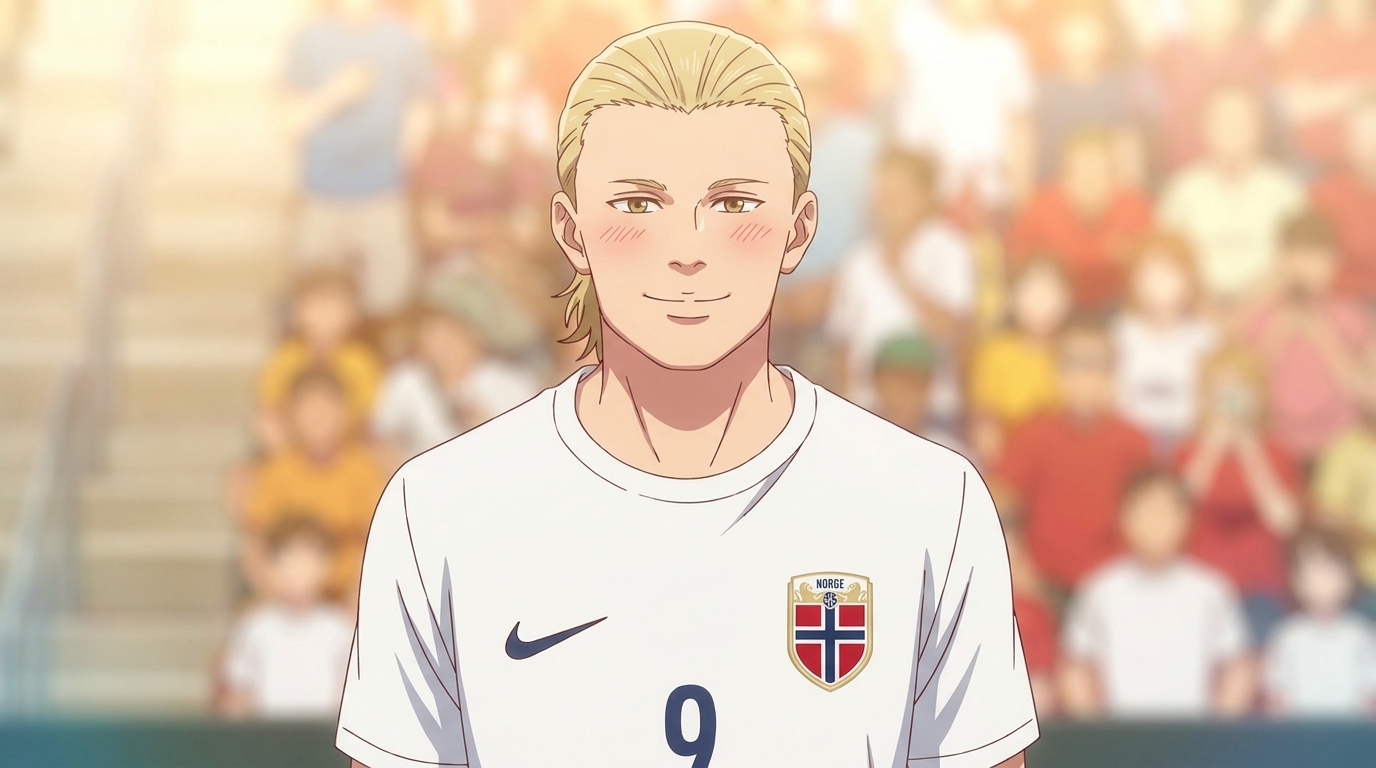
Open AutoWeeb's character creator and write a complete visual reference for your protagonist. Describe what they look like specifically: height relative to other characters, hair color and style, facial structure, build, default kit, and the one physical quality that communicates who they are before they touch the ball. For a Norway-inspired striker, that is height, blonde hair worn slightly long, and the particular expression of someone who is dangerous not because they are loud but because they are precise.
Example main character sheet prompt for a World Cup striker: "Male, tall, lean but physically powerful build, visible through the way the kit sits on him rather than through exaggerated proportions. Blonde hair, medium length, slightly disheveled from the match. Clean-featured face with hazel eyes, expression resting at focused and slightly remote, the kind of focus that reads as calm under pressure. Default outfit: white national team jersey, number 9, with the national crest at the chest, dark blue shorts, white socks pulled to the knee, cleats. In action shots, the kit shows slight wear from the match. Anime style, clean dramatic linework, shonen proportions, realistic athletic build rather than exaggerated musculature."
Save this character sheet to your AutoWeeb project library as soon as it produces a result you want to anchor the production to. Every subsequent generation in the project will reference this saved sheet. The protagonist's face in the tunnel before the match and in the freeze-frame of the winning goal should be recognizably the same person.
Outfit Variations for the Story Arc
Build at least two outfit variations alongside the default kit. One for the pre-match and tactical scenes, where the character is in training gear or a warm-up jacket, and one for the emotional peak, the post-match scene, whether that is celebration or devastation. A third variation works well for the flashback sequences that shoune sports anime uses to establish why this match matters: the character in youth kit, years younger, in the moment that set everything in motion.
Step 2: Write Your Script and Storyboard with AutoWeeb's AI Agent
AutoWeeb's AI Agent is the writing and planning layer of the production. Once your character sheet is saved, open the Agent and give it the match concept, the emotional arc, and the shounen story beats you want the short to hit. The Agent will generate a scene-by-scene script and a storyboard structure, which you then refine into the specific shots you will generate.
Prompting the AI Agent for Script and Story Structure
Kalshi's shorts work because they follow the shounen match arc almost exactly: the match is not going well, the protagonist faces a moment of doubt, something shifts in their interior state, and then the sequence that delivers the emotional payoff. Brief the Agent with that structure and let it generate the scene breakdown and dialogue.
Example Agent prompt: "Create a script and storyboard for a five-scene anime short about a World Cup semifinal. The protagonist is a tall blonde striker, number 9, playing for a Nordic national team. The tone is shounen sports anime: emotional interiority, high-stakes match tension, one flashback sequence that explains why this goal matters. Arc: Act 1, the stadium and team tunnel before kickoff, establishing the protagonist's focus; Act 2, the match midway through the second half, the team is one goal down, the protagonist has been marked out of the game; Act 3, a brief flashback to the training ground where the protagonist's father coached him as a child; Act 4, the breakaway sequence leading to the goal, slow-motion treatment; Act 5, the full-time moment. Include shot descriptions and camera directions for each scene."
The Agent will return a full script with dialogue and interior monologue, plus storyboard panel breakdowns for each sequence. Review the output against your concept. The storyboard is the production plan: every panel is an image you will generate, and the panels in sequence are the edit of the short.
Calibrating the Shounen Emotional Beats
The defining quality of a Kalshi-style short is that the match footage is emotionally legible without any prior knowledge of the teams. That is a shounen sports technique. The viewer does not need to know who Norway is. They need to understand that this person has trained their entire life for this moment, that something almost stopped them from reaching it, and that the goal, when it comes, means something specific and earned. Ask the Agent to write the interior monologue for the protagonist in the flashback sequence and the approach to the decisive kick. Those few lines of dialogue or voiceover are the emotional spine of the short, and they should be locked before you storyboard the images.
Step 3: Create Your Locations
Each location in your storyboard needs a saved reference in your AutoWeeb project library. A location reference is a prompt that describes the visual identity of the place with enough specificity to regenerate consistent environments across multiple panels. For a World Cup short, that means the stadium needs to look like the same stadium in the wide establishing shot and in the tight action sequence.
Building Location References
A five-scene World Cup short typically needs three locations: the stadium exterior and tunnel for the opening, the pitch itself for the match scenes, and one secondary location for the flashback. The pitch is the location that will appear most often and needs the most detailed reference.
Example stadium pitch location prompt: "International football stadium, large capacity, stands visible on all sides rising steeply from the pitch. The pitch is lit by afternoon sun cutting across the field at a low angle, creating strong shadow lines along the turf. The corner flags are visible at the edges of the frame. The crowd in the stands is rendered with individual faces visible in the lower rows and a compressed mass of color in the upper tiers, flags and scarves in national colors. Advertising hoardings at pitch level. Anime style, clean and detailed, the visual fidelity of a premium sports anime production, warm golden-hour light."
Example training ground flashback location prompt: "Youth football training ground, modest and functional. A single pitch with worn turf, a low metal fence at the perimeter. Late afternoon light, slightly overcast, the diffused light that makes European training grounds feel intimate rather than grand. One portable goal. No crowd, just the sound implied by the composition. Anime style, slightly muted palette compared to the main match scenes, the visual grammar of memory and early formation."
Save each location to your project library before generating any scenes. When a storyboard panel is set on the pitch, you will @tag the pitch reference. When a panel is the flashback, you will @tag the training ground. This is how the stadium looks like the same stadium across every match scene.
Step 4: Create More Characters and Change Their Outfits and Looks
A World Cup short needs a full cast. The protagonist needs teammates whose reactions sell the emotional stakes of the match. The opposition needs at minimum one recognizable character who functions as the rival or the obstacle. The crowd needs representation from both fan bases. And the goalkeeper, in the decisive scene, is as important as the striker: the contest between them is the moment the short is building toward.
Building the Supporting Cast
For each supporting character who appears in more than one scene, write a shorter but equally specific reference. Focus on the details that make them instantly distinguishable: silhouette, hair, one defining visual element. For national team players, the jersey number and one physical characteristic that is recognizable in motion.
Example opposing goalkeeper character sheet prompt: "Male, late twenties, powerfully built, broad shoulders and long reach visible in how he positions himself in the frame. Short light brown hair. Expression default is intense concentration, eyebrows slightly set, the expression of someone who has been reading the game for ninety minutes and is still processing. Default outfit: goalkeeper jersey in contrasting color to both teams' outfielder kits, gloves visible at the ends of the arms. In action shots, the jersey is stretched from movement. The character reads as the obstacle rather than the antagonist. Anime style, shonen sports, clean dramatic linework."
Outfit and Look Variations Across the Story Arc
AutoWeeb lets you generate outfit variations for any saved character. For a production that covers pre-match through the final whistle, you need at least one variation per major scene context. The protagonist in a warm-up jacket in the tunnel is different from the protagonist on the pitch in the second half with visible exertion. The flashback variation, younger, different kit, earlier in the character's life, is a separate saved reference.
For the opposing team, create a version that reflects the match's progression. At kickoff, the opposition is composed and controlled. By the decisive scene, they have been in a match too. The expressions and the visible wear on the kit should reflect what the story has put them through. That visual continuity, characters who look like they have been in the events of the anime, is what separates a produced short from a collection of well-prompted images.
Step 5: @Tag All Your Assets in Each Storyboard Shot, Then Generate Images
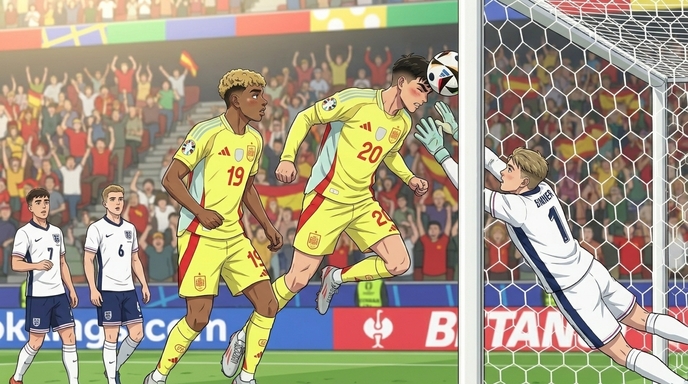
This is the step that separates a production from a collection of prompts. AutoWeeb's @tagging system lets you reference any saved character sheet or location directly inside a storyboard shot prompt. When you @tag a character, the generation draws from your saved visual reference for that character rather than reconstructing them from context in the prompt text. For a World Cup short where the protagonist needs to be recognizable across fifteen or twenty panels, that consistency is what makes the short feel like an anime rather than like a series of AI images.
How to Structure an @Tagged Shot Prompt
For each storyboard panel from your AI Agent output, write the shot description and add @tags for every named asset that appears in the frame. A match panel with the protagonist breaking into open space should @tag the protagonist, the pitch location, and any teammate or opposition character in the frame.
Example @tagged storyboard shot prompt: "Low angle dynamic shot, @striker-protagonist breaking from the center circle into open space in the final third, left side of frame. @stadium-pitch in the background, crowd visible behind the advertising hoarding. @goalkeeper in the far right of frame, repositioning as the run develops. The protagonist's body is angled forward, weight shifted, the visual grammar of a player in full acceleration. Golden afternoon light raking across the pitch from the left. Anime style, shonen sports, motion lines on the background to indicate speed. Frame is held just before first contact with the ball."
Example @tagged flashback shot prompt: "Medium close-up, @striker-protagonist-youth kneeling on the grass of @training-ground-flashback, picking up a ball that has rolled to him. @father-character crouching beside him, hand on his shoulder, saying something the viewer can see but not quite hear. Warm overcast afternoon light. The composition is quieter and more intimate than the match scenes, lower saturation, slightly softer focus on the edges of the frame. Anime style, memory sequence visual treatment."
Generate scenes in storyboard order, working panel by panel through each scene before moving to the next. Review each generated image against its storyboard beat before continuing. Catching visual drift at the panel level is easier than correcting it across a finished sequence.
Checking Consistency Across the Match Scenes
After generating all the panels for a scene, review them as a sequence. The protagonist should occupy the same physical space relative to other players in every pitch panel. The crowd color and density should be consistent across every wide shot set in the stadium. The lighting direction, afternoon sun from the left, should not shift between panels set in the same match. If something has drifted from a prior panel, return to the @tagged prompt and regenerate before moving to the next scene. Consistency at the image stage makes the video stage considerably cleaner.
Step 6: Generate Videos and Assemble Your Anime Short
Not every storyboard panel needs to become a video clip. For a World Cup-style short, prioritize video generation for the five or six panels where motion is the content: the tunnel walk that establishes the pre-match atmosphere, the breakaway run leading to the goal, the slow-motion ball strike, the goalkeeper dive, and the reaction sequence after the decisive moment. The remaining panels, the flashback, the coaching exchange, the character close-up before the match, are stronger as stills and do not lose anything by staying static.
Writing Motion Prompts for Key Scenes
For each priority panel, write a motion description before sending it to AutoWeeb's video generator. Specify what moves, the timing of the key beat, and what the camera does during the clip.
Example video motion prompt for the goal sequence: "Low angle slow-motion shot, @striker-protagonist striking the ball from just inside the penalty area. The contact happens at the one-second mark. The ball leaves the frame at the upper right, spinning visibly. The camera is positioned slightly below the protagonist's waist level, so the figure fills the upper half of the frame against the stadium background. After contact, the protagonist's follow-through carries the leg upward and the body rotates slightly right. The crowd in the background is blurred through motion and emotion. @stadium-pitch visible behind. Anime style, shonen sports, high frame-rate visual quality. Five to seven seconds."
Example video motion prompt for the tunnel sequence: "Medium shot walking forward down a stadium tunnel, fluorescent lighting overhead creating a strong shadow rhythm on the floor. @striker-protagonist walking in the center of the frame, slightly ahead of the rest of the squad visible at the edges of the frame. The protagonist's hands are loose at the sides, expression forward, completely still while everything else moves. The camera tracks forward at walking pace. The tunnel opens to bright daylight at the end of the frame. Anime style, slow deliberate camera movement, four to five seconds, the opening shot of the production."
Assembling and Distributing the Short
With still panels covering every storyboard beat and video clips carrying the kinetic sequences, assemble the short in storyboard order. Still panels carry the flashback, the coaching moment, the character close-up, and any dialogue-driven scene. Video clips carry the tunnel, the match action, and the goal sequence. The assembled short runs between sixty seconds and two minutes, which is the format that performed best for Kalshi on social platforms. Export a full-length cut and a sixty-second highlight cut from the goal sequence and the tunnel shot for short-form distribution.
For YouTube, front-load the most visually striking panel as the thumbnail. For TikTok and Instagram Reels, the first three seconds need to be the goal or the tunnel, not the flashback. Cut the social versions to lead with the highest-impact clip and build backward into the emotional context.
Frequently Asked Questions
What made Kalshi's World Cup anime shorts go viral?
The combination of real tournament stakes and shounen anime emotional grammar. World Cup audiences are already emotionally invested in the match outcomes. Kalshi's shorts gave those outcomes a visual language that sports broadcasts do not: interior monologue, the slow-motion moment before the decisive action, the flashback that explains why this player has been building toward this specific instant. Anime is designed to make you feel something for a character in a short amount of screen time, and the World Cup provides the stakes that anime spends multiple episodes constructing. The overlap is powerful and largely untapped.
Can I create anime content around a real World Cup match or player?
Fan-created anime and parody content based on public sporting events has a long history across anime and sports media culture. AutoWeeb generates original anime art from your descriptions and character sheets. The creative framing, which match, which players, which story arc, is yours to build. Content that is clearly a creative interpretation rather than an official broadcast or licensed product generally sits within the tradition of fan-made sports content that has always existed around major tournaments.
How do I capture a real player's appearance in an anime character sheet without it looking generic?
Focus on the combination of physical specifics that makes the person immediately recognizable in anime visual language, not on trying to generate a photorealistic likeness. Height relative to other players. Hair color and style. The specific quality of how they hold themselves on the pitch: a player who looks composed under pressure reads differently in a character sheet from one who looks aggressive. One or two defining physical details, combined with a build description and a specific expression quality, produce a character that reads as the intended reference even in full anime style.
What is the @tag system and why does it matter for a multi-scene production?
When you describe a character from scratch in each individual prompt, small variations accumulate across generations. Hair that reads slightly different across panels, a build that shifts, an expression that does not match the established reference. The @tag system references a saved document rather than re-describing from memory. The protagonist in panel one and the protagonist in panel eighteen are drawn from the same saved visual anchor. For a short built around a recognizable player or team identity, that consistency is especially important, the audience will notice immediately if the protagonist's appearance has drifted between the tunnel and the goal.
How many characters need full saved sheets versus appearing as background figures?
Save sheets for every character who appears in more than two scenes or has a close-up or dialogue moment. For a World Cup short, that is typically the protagonist striker, the opposing goalkeeper, one teammate who drives the emotional subplot, and the flashback father figure. Players who appear only in wide crowd or match scenes do not need individual sheets, but any character with a named scene role does. Generating background crowd figures from the location reference rather than individual character sheets is standard practice for match scenes.
Which scenes should I prioritize for video versus still images?
Prioritize video for scenes where the story's impact depends on motion: the tunnel walk, the breakaway run, the strike, the goalkeeper dive, and the reaction after the decisive moment. The flashback sequences, dialogue scenes, and the pre-match character close-up work as stills without losing any emotional information. Spend video generation on the scenes where a freeze frame would feel incomplete. The goal is the sequence most viewers came for, and it should be a video clip.
How long does it take to produce a complete World Cup anime short in AutoWeeb?
A five-scene short with four to five video clips takes most users two to three focused sessions. The first session covers character sheets, outfit variations, and location references. The second covers AI Agent scripting, storyboard generation, and image generation across all panels. The third covers video generation for priority scenes and final review. Working in discrete sessions makes it easier to review each stage's output against the production plan before committing to the next step, and the tournament pace of the World Cup means a short produced in three sessions is still timely content during the group stage.
Can I use the same workflow for other sports or tournaments?
Yes. The character sheet, AI Agent scripting, location building, @tag generation, and video pipeline are the same for any sport. The World Cup format adapts naturally because it has a built-in tournament arc structure, but the same workflow produces strong content for Champions League finals, domestic cup matches, NBA playoffs, or any sporting event with recognizable emotional stakes and a built-in audience. The sport and the specific match inform what you put into each step. The production structure stays consistent.
For the broader sports anime production pipeline, including full season structure, rival design, and training arc storyboards, the guide on how to create a World Cup soccer anime with AutoWeeb covers the extended production workflow. If you want to apply the same approach to a basketball concept, how to create anime videos like Attack on Wemby covers the full pipeline for an athlete-as-protagonist short with a genre-shifted premise.
Related Blog Posts
How Indie Manga Creators Can Turn Their Manga Into an Anime
A practical guide for independent mangaka, comic creators, and anime enthusiasts who want to adapt their existing manga into a watchable anime, from arc selection and character sheets through storyboards, AI image generation, and video production.
Learn how indie manga creators can turn manga into anime using AI. Select the right arc, build character sheets, storyboard panels, and generate anime scenes and video without a studio.
How to Turn Your Manhwa Into an Anime Using AI
A complete guide for manhwa creators, webcomic artists, and digital storytellers who want to adapt their work into anime, from evaluating your story and building character sheets through storyboards, AI image generation, and video production.
Learn how to turn your manhwa into an anime using AI. Build character sheets, storyboard vertical panels into cinematic scenes, generate anime images, and create video without a studio.
How to Turn Your Wattpad Story Into an Anime Series with AI
A complete guide for Wattpad authors who want to adapt their stories into indie anime, from episode structure and character sheets through storyboards, AI image generation, and video production.
Learn how to turn your Wattpad story into an anime series with AI. Design characters, storyboard scenes, generate anime images, and create anime video episodes without a studio.
How to Turn Your AO3 Fanfiction or Original Story Into an Anime
A practical guide for AO3 writers, fanfiction authors, and original fiction creators who want to adapt their stories into anime, from story selection and character design through storyboards, AI image generation, and video production.
Learn how to turn your AO3 fanfiction or original story into an anime with AI. Design characters, storyboard scenes, generate anime images, and create video without a studio.
Explore AutoWeeb
Jump into the tool that fits your creative step.
AI Anime Video Generator
Animate storyboard shots into cinematic clips with Seedance 2 and consistent characters.
Anime Character Creator
Design original characters with consistent sheets across every scene.
AI Anime Image Generator
Generate cinematic anime stills anchored to your character library.
Anime Filters
Upload any photo and apply AI anime filters to turn it into stunning anime art in seconds.
AI Anime Location Generator
Create a location set once, then generate reference images from every angle.
AI Anime Storyboarding
Describe your idea, pick your characters, and let AI draft the script and scenes.
AI Anime Prompt Agent
Turn a rough idea into a cinematic Seedance 2 prompt with the AI Director.