
How to Choose the Right Genre Before Creating an AI Storyboard
The genre decision that locks your script, your pacing, and every panel on the storyboard — and how to make it before you open a single generation tool.
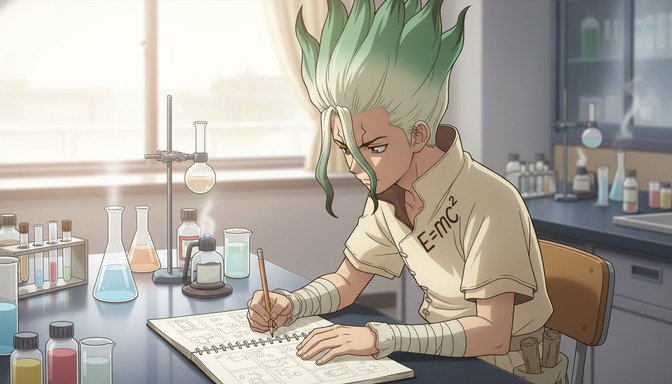
Most creators who want an AI storyboard already have a scene in mind: a confession under cherry blossoms, a tournament final, a quiet reunion after years apart. What they do not have yet is the genre for storytelling that makes those scenes feel inevitable rather than borrowed from a show they watched last week. Jumping straight to storyboard planning without that decision is how projects end up with a romance beat in a thriller frame, or action pacing in a slice-of-life register. The panels look polished. The story feels wrong.
This guide is for US creators ready to move from a vibe to a finished short: how to choose story genre before you write a script, how to pressure-test story genre ideas with concrete examples, and how AutoWeeb's storyboarding AI agent turns your genre choice into a script you can storyboard without staring at a blank page. Genre first. Script second. Storyboard third. That order saves hours of regeneration.
Why you must choose story genre before storyboard planning.
A storyboard is a sequence of decisions: who is in frame, how wide the shot is, what the environment communicates, what the viewer should feel in panel three versus panel seven. Every one of those decisions is easier when the genre for storytelling is already locked. Genre is not a marketing label. It is a contract with the audience about pacing, stakes, visual language, and what kinds of endings feel earned.
Action-shonen storytelling assumes escalation: wider shots for scale, faster cuts for impact, a protagonist whose want is tested through external conflict. Romance assumes proximity and hesitation: closer framing, held pauses, environments that isolate two people from the crowd. Slice-of-life assumes ordinary texture: medium shots in familiar spaces, emotional weight in small gestures rather than plot explosions. If you storyboard before you choose story genre, the model fills the gaps with whatever genre it saw most often in training data. You get generic anime, not your anime.
Storyboard planning without genre is also expensive in credits. Each panel you generate without a clear register is a guess. Lock genre once, and your script beats, shot types, and art style anchors all point the same direction. The guide on creating your own anime story covers protagonist and conflict in depth; this post covers the decision that should happen even earlier.
Step 1: Choose story genre from the feeling you want, not the show you copied.
The reliable way to choose story genre is to start with audience emotion, then pick the package that delivers it. Ask: what should someone feel at the end of this short? Breathless and hyped? Quietly devastated? Warm and relieved? The answer narrows your options immediately.
- Urgent exhilaration → action, sports, battle shonen
- Slow ache or tenderness → romance, josei, slice-of-life drama
- Dread or unease → psychological thriller, horror, mystery
- Wonder and displacement → isekai, fantasy adventure
- Comfort in the ordinary → slice-of-life, cozy school stories
Once the feeling is clear, name the genre that gives it the most room. If you want tenderness but keep writing fight choreography because your favorite series is action-heavy, you are fighting your own story development. The genre should carry the feeling, not compete with it.
The one-sentence genre test.
Finish this sentence before you touch storyboard planning: "This story is a [genre] about [protagonist] who wants [concrete goal] but [specific obstacle], and by the end the audience should feel [emotion]." Example: "This story is a sports drama about a midfielder who wants to start in the championship match but keeps choking in practice, and by the end the audience should feel earned relief." If you cannot complete the sentence, you are not ready to storyboard. You are ready to clarify genre.
Step 2: Compare story genre ideas with examples that fit AI storyboards.
Strong story genre ideas for AI workflows share one trait: they produce readable visual beats in eight to twelve panels. Vague concepts ("something cool") storyboard poorly. Specific premises storyboard fast.
Romance / slow-burn confession.
Premise: two classmates share a rooftop at dusk every week; tonight one finally speaks. Script beat examples: wide establishing shot of empty rooftop, medium shot of nervous hands on the railing, close-up on eyes avoiding contact, hold on shared silence, close-up when dialogue lands. Genre locks soft lighting, cherry or city skyline backgrounds, and close framing. Pair with anime romance story workflows when you want relationship arcs beyond a single short.
Action / tournament climax.
Premise: a disgraced fighter faces the rival who framed them in the final match. Beats: arena wide shot, opponent shadow crossing stone, medium close-up on scar and jaw, impact panel, still wide resolution. Genre locks dynamic angles, high-contrast lighting, and motion language in video clips. The anime fight scene guide covers action panel grammar in detail.
Mystery / deduction reveal.
Premise: a detective pieces together how the locked-room trick worked. Beats: crime scene wide, evidence insert shots, overhead table layout, extreme close-up on the telling detail, reaction close-up. Genre locks clean linework, spotlight shadows, and informational inserts. Detective Conan-style aesthetics are a natural fit; see the Detective Conan style page for visual anchoring.
Slice-of-life / ordinary interrupted.
Premise: a girl who always eats alone finds an empty seat taken by someone who remembers her lunch order. Beats: cafeteria wide, medium on tray and hands, small smile beat, window light medium-wide landing. Genre locks muted palettes, everyday environments from slice-of-life photo packs, and restrained camera movement.
Step 3: Write the script with AutoWeeb's storyboarding AI agent before you generate panels.
Genre tells you what kind of story you are making. The script tells you what happens, in what order, with what dialogue or action line in each beat. AutoWeeb's storyboarding AI agent is built for this middle step: you bring the genre, the premise, and the emotional landing; the agent drafts beat-by-beat scene descriptions, suggested shot types, and plain-English action you can refine into panel prompts.
You do not need screenplay formatting. You need beats a storyboard can execute. Tell the agent something like: "Slice-of-life romance, two students, rooftop at dusk, she is working up the courage to return a borrowed book, three beats, quiet ending." It returns structured beats: establishing wide, hesitation medium, confession close-up, each with enough visual detail that storyboard planning is assignment work, not invention from zero.
The agent also keeps story development coherent across beats. If beat two is an internal close-up, beat three should not jump to an unrelated action set-piece unless your genre is comedy or action and you intended the whiplash. Romance scripts that suddenly add a chase scene are a genre mismatch the agent flags when you describe the genre upfront. Treat the agent as a writing partner who knows anime pacing, not as a replacement for your premise.
Refine the draft in one pass before storyboard planning: cut beats that do not serve the ending emotion, name the protagonist's want in each beat, and add one art style anchor (Ghibli warmth, shonen sharpness, mystery clean lines) so downstream generations stay consistent. If you already have a saved character, mention them in the agent prompt so beat descriptions reference the same visual identity the storyboard will use.
Step 4: Turn the script into storyboard planning beats.
With genre locked and script beats written, storyboard planning is listing what each beat needs visually. For every beat, answer four questions: who is in the scene, where are they, what is the camera distance, what should the viewer feel. A romance script beat "she almost speaks, then stops" becomes: medium close-up, rooftop railing, dusk backlight, frustration and tenderness mixed.
Group beats by shared setting so you batch generations efficiently. All rooftop beats in one session. All arena beats in another. Assign your saved character from the anime character creator before generating so panels do not drift between faces.
Order matters in action and mystery genres. Storyboard fight sequences in chronological panel order, not random generation sorted later. Mystery reveals depend on insert shots landing after wide context. Slice-of-life can be more forgiving, but emotional climaxes still need the setup panel before the close-up.
Step 5: Assemble the AI storyboard and continue story development.
AutoWeeb's storyboarding feature takes your planned beats from script to sequenced panels and clips. Assign each generated image or video clip to its beat position, keep the same character on every panel, and preview transitions the way an editor would check a rough cut. Genre informs whether a hard cut or a held pause between beats feels right; romance and slice-of-life often need longer holds, action needs sharper contrast between wide and close.
Story development does not stop at the first storyboard. The first board is a prototype. Watch the assembled sequence. If beat two feels like filler, the script beat was under-defined, not the model. If the ending emotion misses, revisit genre: you may have written a thriller beat structure with a slice-of-life genre label. Adjust the script in the storyboarding AI agent, regenerate only the affected panels, and re-sequence.
For video shorts, translate each storyboard panel into one clip prompt, or let the video agent expand your beat description into full Seedance-ready language. The guide on turning an idea into an AI anime video walks through three-beat assembly when you are ready to move from still panels to motion.
Frequently asked questions about choosing genre before an AI storyboard.
Can I change story genre after I have already started storyboard planning?
Yes, but expect to rewrite the script, not just restyle panels. Genre affects pacing and shot grammar, not only color palette. If you pivot from action to romance mid-project, beats that were impact panels may need to become proximity and reaction shots. Use the storyboarding AI agent to regenerate beat descriptions under the new genre, then replace panels in order.
What are the best story genre ideas for a first AI storyboard?
Slice-of-life, slow-burn romance, and single-location mystery shorts are the most forgiving first projects. They need fewer locations, smaller casts, and clear emotional landings in three to eight beats. Tournament action and isekai epics are satisfying but punish vague scripting with confusing panel geography. Start with one location and one emotional target, then scale up.
Do I need to know how to write a screenplay to use the storyboarding AI agent?
No. The agent works from plain-English premises: genre, characters, setting, number of beats, ending emotion. It outputs beat lists and scene descriptions you can edit like outline notes. Formal screenplay structure is optional. What you need is specificity: who wants what, what blocks them, and how the viewer should feel when the last panel holds.
How is genre for storytelling different from anime art style?
Genre is narrative rules: pacing, stakes, typical shot progression, what endings feel earned. Art style is visual execution: line weight, color palette, lighting tradition. You need both before storyboard planning. A romance genre with horror art style can work as intentional contrast, but only if you choose it on purpose. Default mismatch reads as accidental. The guide on choosing anime art style for AI generations pairs with this post for the visual half of the decision.
How many storyboard panels should a short script have?
Three beats is the minimum for a coherent short (setup, turn, landing). Eight to twelve panels is enough for a one-to-two minute sequence with inserts and reactions. More panels without more script development usually means repetition, not depth. Each panel should map to a beat the script already justifies.
Does AutoWeeb's storyboarding AI agent write dialogue too?
It can suggest dialogue lines or internal monologue tied to each beat when you ask for them. You should still edit lines for voice and length. AI anime shorts often work with little or no dialogue when facial expression and framing carry the beat. Romance and comedy benefit more from short, specific lines than action genres do.
What if I have two story genre ideas and cannot decide?
Run the one-sentence genre test for both. Write two premises and ask which ending emotion matters more to you. If still tied, storyboard the first beat only for each genre (one establishing panel per idea) and compare which image makes you want to see the next beat. The stronger pull is your genre. The other idea becomes your next project.
Where does character creation fit in this workflow?
After genre, alongside or immediately after the first script draft. Visual identity should be stable before you generate multiple storyboard panels. Build the protagonist in the character creator or via photo-to-anime, save the sheet, then assign that character when you enter storyboard planning. Genre tells you what story you are telling; the character sheet tells you who is telling it.
Choosing the right genre before an AI storyboard is the difference between a sequence that reads as directed and a folder of strong images that never become a story. Lock genre, draft the script with the storyboarding AI agent, plan beats with intention, then generate. For the full storytelling toolchain, the post on the best AI tool for anime storytelling connects storyboards, scenes, and long-form development. When you are ready for motion, writing AI anime video prompts picks up where the last storyboard panel leaves off.
Related Blog Posts
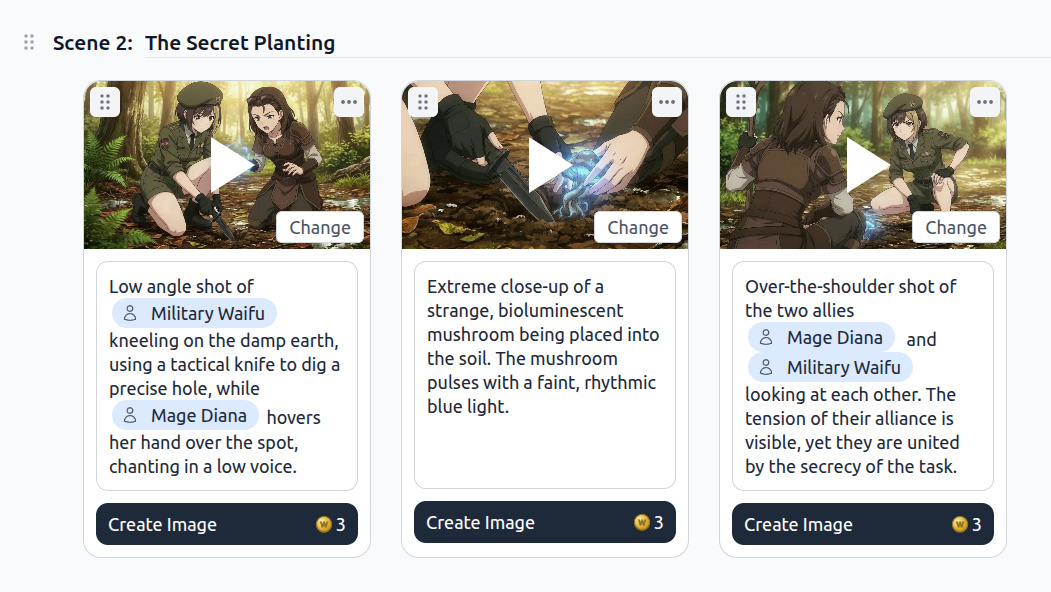
Introducing the Anime Storyboard Creator
Write your anime script and bring every scene to life with AI-generated images and videos.
AutoWeeb's new storyboard feature lets you write an anime script and generate images and videos for every scene. Meet the anime storyboard creator.
AI Anime Land Beats and Cliffhangers for YouTube Shorts
The last three seconds earn the next upload. Storyboard the land, generate one hold, and end on a question viewers cannot scroll past.
Design AI anime land beats and cliffhanger endings for YouTube Shorts: payoff panels, one-action holds, honest thumbnails, and prompts that lock your saved OC before EP02.
AI Anime Turn Beats for YouTube Shorts
The middle seconds deepen the hook without stealing the land. Storyboard one escalation, generate one action, and hand off to the cliffhanger on purpose.
Design AI anime turn beats for YouTube Shorts: middle-beat storyboard rows, one-action escalation prompts, b-roll handoffs, and saved OC locks before the land hold.
Creating an Anime Series with AI in 2026
A single-cour production grid for YouTube creators: twelve beats, one locked protagonist, and a still-to-motion chain that ships like a show.
Creating an anime series with AI in 2026 means a twelve-episode grid, locked protagonists, and Shorts-ready motion. A production workflow for YouTube video creators.
Explore AutoWeeb
Jump into the tool that fits your creative step.
AI Anime Video Generator
Animate storyboard shots into cinematic clips with Seedance 2 and consistent characters.
Anime Character Creator
Design original characters with consistent sheets across every scene.
AI Anime Image Generator
Generate cinematic anime stills anchored to your character library.
Turn Photo Into Anime
Upload any photo and watch AI turn it into stunning anime art in seconds.
AI Anime Location Generator
Create a location set once, then generate reference images from every angle.
AI Anime Storyboarding
Describe your idea, pick your characters, and let AI draft the script and scenes.
AI Anime Prompt Agent
Turn a rough idea into a cinematic Seedance 2 prompt with the AI Director.