
How to Make an Epic War Anime with AI
A beginner's step-by-step guide to producing an original war anime: character arcs, military factions, worldbuilding, battle choreography, cinematic camera angles, environmental storytelling, and AI-assisted animation with prompt templates for every scene type.
The best war anime does not start with a tank battle. It starts with a character who has something to lose. 86 -Eighty Six- opens on a pilot who has never been allowed to have a name. Code Geass opens on a prince who has lost everything except a grudge. Full Metal Panic! opens on a soldier who does not know how to be anything else. The hardware, the factions, and the destruction are the world. The character arc is the story.
This guide is a step-by-step production workflow for beginners who want to build an original war anime with AI in AutoWeeb. You will learn how to design character arcs, define military factions, build a world that feels lived-in, choreograph battle sequences, frame scenes with cinematic camera angles, use environmental storytelling, and animate key moments with AI-assisted video generation. Start in the anime character creator to lock your cast, then bring battle sequences to life in the AI anime video generator. Every section includes copy-paste prompt templates for infantry, tanks, aircraft, commanders, battlefield destruction, and emotional character beats.
Step 1: Define Your Character Arcs Before You Generate Anything
A war anime without character arcs is a slideshow of explosions. Before you open the anime character creator, answer three questions for your protagonist and at least one supporting character:
- Who were they before the war? This shapes their design, their gear, and their default expression.
- What do they believe at the start of your story? This is the belief the war will test.
- What must they become by the end? This is the visual and emotional transformation your storyboard needs to show.
A classic war anime arc moves from certainty to doubt to a harder-won conviction. Your protagonist might begin believing the war is righteous, lose that certainty in the midpoint battle, and arrive at a more complicated truth by the final episode. That arc needs three visual states: the character at the beginning (clean gear, focused expression), the character at the breaking point (damaged gear, exhausted expression), and the character at resolution (worn but deliberate, a new expression quality).
Protagonist Character Sheet Prompt
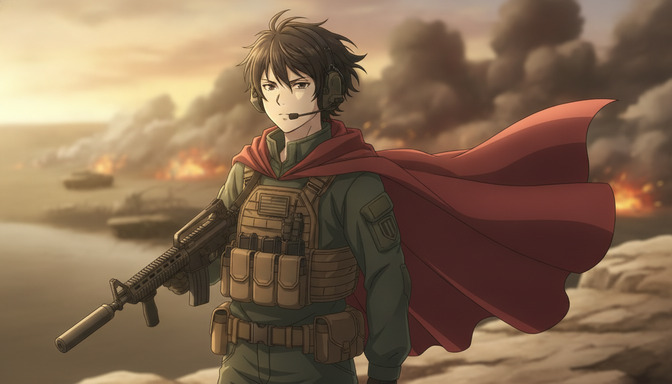
Example protagonist prompt: "Male, early twenties, lean athletic build. Messy dark brown hair, serious determined expression, amber-brown eyes. Olive-green military uniform under a tan tactical plate carrier with magazine pouches, large over-ear tactical headset with boom mic. Holds a suppressed M4-style assault rifle across his chest. Optional: a long red cape flowing to one side for heroic anime flair. Anime style, clean dramatic linework, cel-shaded, war anime protagonist proportions. Medium shot, character readable at close range."
Save this character sheet to your AutoWeeb project library immediately. Use the anime character creator to build outfit variations: full combat loadout for battle sequences and a lighter briefing-room or off-duty version for emotional scenes. The protagonist in episode one and episode twelve must be recognizably the same person.
Emotional Character Moment Prompt
War anime lives in the quiet beats between battles. Generate these deliberately.
Example emotional moment prompt: "Medium close-up, @protagonist kneeling beside a fallen comrade's helmet on the battlefield, hands resting on the helmet, eyes downcast. Smoke and distant fires soft-focused in the background, golden hour light from the left. Expression is grief held in check, jaw set. Anime style, cel-shaded, restrained emotional lighting. No action, no weapons raised. The stillness is the point."
Example breaking-point prompt: "Close-up, @protagonist face covered in soot and sweat, one eye visible through disheveled hair, expression shifting from shock to hollow resolve. Background completely blurred, single harsh light from the right. Anime style, high contrast, war anime emotional peak framing."
Step 2: Design Your Military Factions
Factions give your war anime visual identity. Each side needs a distinct color palette, uniform silhouette, and one defining design element that makes them instantly recognizable in a wide shot. You do not need encyclopedic lore. You need enough visual differentiation that viewers know who is fighting whom without reading subtitles.
Building Faction Visual Identity
Define these elements for each faction before generating soldiers:
- Primary color: olive drab and tan for one side, digital camouflage green and brown for another.
- Insignia: a simple geometric mark on shoulder patches, not real-world military insignia.
- Equipment era: both factions should feel contemporary or near-future, not mixed eras.
- Vehicle livery: tanks and aircraft painted in faction colors, visible at a distance.
Faction Soldier Prompt Templates
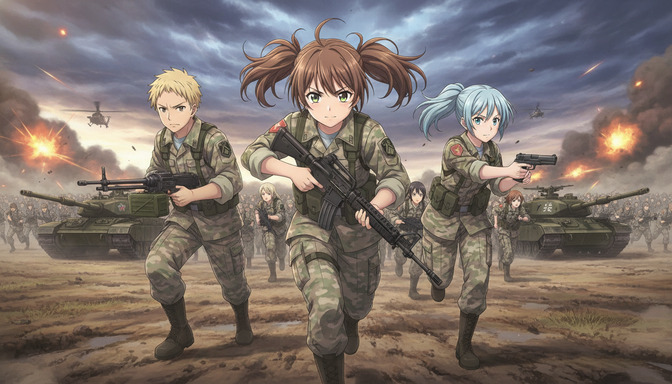
Example Faction A infantry prompt: "Female soldier, brown hair in messy twin pigtails, determined green eyes, charging forward with an M4-style assault rifle. Digital camouflage fatigues in green and tan, tactical vest with red and gold unit patch on the shoulder. Anime style, cel-shaded, war anime infantry design. Medium shot, dynamic forward-leaning pose."
Example Faction B infantry prompt: "Male soldier, short spiky blonde hair, serious expression, carrying a light machine gun at the ready. Dark olive uniform with gray tactical vest, no visible insignia. Anime style, cel-shaded, distinct silhouette from Faction A soldiers. Medium shot, combat-ready stance."
Save one character sheet per named soldier on each side. Background infantry in wide battle shots can be generated from the faction prompt without individual sheets.
Step 3: Worldbuilding Through Environment
Your war anime world is communicated through what the camera shows, not through exposition text. A command center with flickering monitors tells viewers this faction is losing. A pristine airbase at dawn tells viewers this faction still has resources. A ruined city with a child's toy in the rubble tells viewers what the war costs without a single line of dialogue.
Environmental Storytelling Prompts
Example pre-war location prompt: "Quiet European-style town square before the conflict, cobblestone streets, intact buildings with flower boxes in windows, afternoon sunlight, a few civilians visible in the background. Anime style, warm palette, slice-of-life visual quality. Wide establishing shot. No military presence. The peace is the point."
Example post-battle location prompt: "The same town square after bombardment, collapsed building facades, rubble across the cobblestones, smoke rising from multiple points, a single intact street lamp still standing. Anime style, desaturated palette with warm fire tones in the smoke. Wide shot, no characters visible. Environmental storytelling only."
Save both locations to your project library. Using the same geography before and after the war is one of the most powerful visual storytelling tools in the genre. For a deeper location documentation workflow, see the guide on building an AI anime location bible.
Commander and Command Center Prompts
Example commander character prompt: "Female military commander, late thirties, silver-streaked dark hair pulled back, sharp anime features, expression of controlled authority. Dark uniform with gold rank insignia on the collar, standing before a large tactical display. Anime style, clean linework, cel-shaded. Medium shot, slight low angle to convey authority."
Example command center prompt: "Underground war room, curved tactical display wall showing a regional battlefield map with red and blue unit markers. Rows of operator stations with glowing monitors, dim overhead lighting, blue screen glow on faces. @commander standing at the elevated platform at the rear, facing the display. Anime style, cel-shaded, atmosphere of strategic tension. Wide shot from behind the operator rows."
Step 4: Choreograph Your Battle Sequences
Battle choreography in war anime is not random action. It is a sequence of beats with escalating stakes: the standoff, the opening move, the turning point, the climax, and the aftermath. Plan your battle as five to seven storyboard panels before generating a single image.
The Five-Beat Battle Structure
- Standoff: Two forces facing each other. No contact yet. Tension through composition.
- Opening move: First artillery, first charge, first aircraft pass. The battle becomes real.
- Turning point: One side gains an advantage. A tank breaks through, air support arrives, a commander falls.
- Climax: The decisive moment. Protagonist's arc resolves in action.
- Aftermath: Smoke, silence, the cost visible in the environment.
Infantry Battle Prompts
Example infantry charge prompt: "Low-angle wide shot, three named anime soldiers charging toward camera in the foreground: @protagonist-center with rifle raised, @soldier-left with light machine gun, @soldier-right aiming handgun forward. Vast army of soldiers in matching digital camouflage behind them. Two olive-drab main battle tanks flanking the charge, mud churning beneath treads. Two attack helicopters in the overcast sky. Orange explosions and dark smoke on the horizon. Anime style, cel-shaded, dynamic motion lines on the muddy ground. Epic war anime scale."
Example infantry standoff prompt: "Wide shot, two opposing lines of soldiers facing each other across a no-man's-land of churned earth and shell craters. No contact yet. Overcast sky, wind blowing dust between the lines. Tension through stillness. Anime style, cel-shaded, muted palette. Both factions visually distinct by uniform color."
Tank and Armored Vehicle Prompts
Example tank advance prompt: "Low-angle shot, olive-drab main battle tank advancing directly toward camera, treads churning mud, dust cloud trailing behind. Cannon levelled forward. Anime style, cel-shaded mechanical design with illustrated panel lines, not photorealistic metal. Golden hour rim light on the turret. Single tank centered, battlefield smoke in the background."
Example tank breakthrough prompt: "Wide dynamic shot, main battle tank crashing through a collapsed concrete wall, rubble and dust exploding outward. Infantry following through the breach behind it. Anime style, cel-shaded, motion lines on debris. Low angle, camera at ground level."
Aircraft and Aerial Combat Prompts
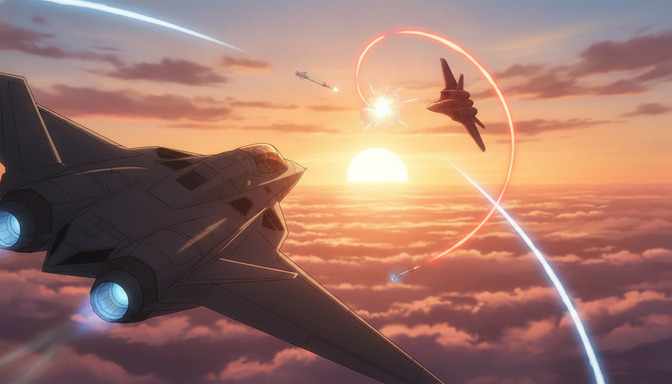
Example dogfight prompt: "Chase-cam perspective from behind a dark gray stealth fighter jet, twin engine nozzles glowing blue with afterburner. Enemy jet performing a tight corkscrew evasive maneuver ahead, glowing orange-red vapor trail spiraling across the sky. Two missiles in flight with thin vapor trails. Sea of clouds below, golden hour sun at the horizon. Anime style, cel-shaded, premium aerial combat anime quality. Dynamic tilted horizon."
Example ground attack prompt: "Medium-wide shot, attack aircraft diving at a steep angle toward a battlefield below, orange afterburner glow visible. Ground forces scattering, explosion blooming where the previous strike landed. Anime style, cel-shaded, dramatic low sun backlighting the aircraft silhouette."
Battlefield Destruction Prompts
Example artillery strike prompt: "Wide shot, multiple orange explosion blooms across a ruined city block, dark smoke plumes rising in columns. Collapsed building facades, rubble in the streets. No characters visible. Anime style, cel-shaded, cinematic destruction scale. Golden hour light filtering through smoke."
Example aftermath wide prompt: "Extreme wide shot, devastated battlefield at dusk, craters and destroyed vehicles scattered across the frame. Single figure silhouette standing at the center, small against the destruction. Smoke drifting, fires burning at low intensity. Anime style, desaturated palette, environmental storytelling. The scale of loss is the subject."
Step 5: Frame Every Scene With Cinematic Camera Angles
Camera angles communicate power, vulnerability, and scale without dialogue. War anime uses a specific shot grammar: low angles for heroism and threat, high angles for vulnerability, extreme wides for the cost of conflict, and close-ups reserved for the moments that matter most.
Shot Types for War Anime
- Low-angle medium close-up: Protagonist before battle. Heroic, determined, human.
- Low-angle wide: Infantry charge or tank advance. Overwhelming forward momentum.
- High-angle wide: Aftermath or defeat. Vulnerability and scale of loss.
- Over-shoulder medium: Commander at tactical display or pilot in cockpit. Operational context.
- Extreme wide: Opening and closing shots. Geography and stakes.
- Close-up: Emotional peaks only. Grief, resolve, the moment everything changes.
Name shot size and camera height in every prompt. "Low-angle medium close-up, camera at chest height looking up" produces a directed frame. "Cinematic dramatic angle" produces a random reframing. For a full breakdown of shot vocabulary, see Cinematic Angles 101: Frame AI Anime Like a Director.
@Tagged Storyboard Shot Examples
Example pre-battle hero shot: "Low-angle medium close-up, @protagonist standing on a rocky ridge overlooking a smoke-filled battlefield, rifle held across chest, red cape flowing to the right. Tanks and fires visible in the soft-focused background. Golden hour backlight creating rim light on hair and shoulders. Expression serious and determined. Anime style, cel-shaded. No dutch tilt."
Example command decision shot: "Over-shoulder medium shot from behind @commander, facing the tactical display wall. Red unit markers advancing on the map. Blue markers in retreat. Screen glow as primary light source on @commander's face. Anime style, cel-shaded, atmosphere of strategic urgency."
Step 6: Write Your Storyboard and Script With the AI Agent
Once character sheets, faction designs, and location references are saved, open AutoWeeb's AI Agent and brief it on your war anime concept. The Agent generates a scene-by-scene script and storyboard structure that you refine into specific @tagged shot prompts.
Example AI Agent prompt: "Create a script and storyboard for a three-episode war anime arc. Protagonist: a young soldier who believes the war is just. Supporting cast: a veteran sergeant who has seen too much, and a rival soldier from the opposing faction who becomes an unexpected ally. Factions: two nations in digital camouflage vs. olive drab uniforms. Arc: Episode 1, deployment and first battle, protagonist's certainty; Episode 2, midpoint defeat, protagonist's belief shattered, emotional aftermath; Episode 3, final battle, protagonist fights for something more complicated than victory. Tone: premium war anime like 86 Eighty Six, emotional restraint, cinematic scale. Include shot descriptions, camera directions, and lighting notes for each panel."
Review the Agent output and rename characters and locations to match your saved @tag references. Generate images panel by panel in storyboard order, checking each against the beat it serves before continuing.
Step 7: Animate Key Moments With AI-Assisted Video
Not every storyboard panel needs video. Prioritize animation for the scenes where motion is the content: the infantry charge, the tank breakthrough, the dogfight, the artillery strike, and the protagonist's walk through the aftermath. Emotional close-ups and command center scenes are often stronger as stills.
Video Motion Prompt Templates
Attach the approved still frame before sending it to the AI anime video generator. Specify one primary motion and one camera behavior.
Example infantry charge video prompt: "Low-angle wide shot, line of soldiers running toward camera, @protagonist centered. Two tanks advancing on both flanks, mud churning beneath treads. Helicopters moving slowly across the overcast sky. Camera holds position as the charge approaches. Anime style, motion lines on the ground, four to six seconds. Explosion flash on the distant horizon at the three-second mark."
Example dogfight video prompt: "Chase-cam from behind lead fighter jet, afterburner glow intensifying. Enemy jet ahead performing corkscrew evasive maneuver, orange vapor trail spiraling. Camera follows the lead jet's pursuit. Anime cel-shaded style, five to seven seconds. Golden hour lighting consistent with the attached still."
Example aftermath walk video prompt: "Wide tracking shot, @protagonist walking slowly forward through smoke and rubble, rifle lowered at his side. Fires burning at low intensity in the background. Camera tracks backward at walking pace, keeping @protagonist centered. Anime style, slow deliberate movement, four to five seconds. Desaturated palette."
Assembling Your War Anime
Assemble in storyboard order: still panels for emotional beats, dialogue scenes, and command sequences; video clips for battle choreography and aerial combat. A single episode runs between three and five minutes for a tight arc. A three-episode arc runs between ten and fifteen minutes total. Export episode cuts and sixty-second highlight clips led by the charge or dogfight sequence for social distribution.
Keeping the Anime Aesthetic: What to Avoid
War anime drifts toward photorealism quickly if your prompts are not specific. These swaps keep every generation in anime territory:
- Replace photorealistic military with anime cel-shaded, clean linework, premium war anime production quality.
- Replace realistic destruction with stylized anime destruction, illustrated debris, cinematic smoke plumes.
- Replace documentary combat footage with dynamic anime action composition, motion lines, dramatic lighting.
- Add no photorealism, no 3D render look when the model drifts toward game-engine aesthetics.
Reject any panel that looks like a photograph with an anime filter. Regenerate with the style anchor repeated in the prompt. Consistency at the image stage makes the video stage considerably cleaner.
Frequently Asked Questions
Do I need to write the full story before generating images?
You need the character arcs, faction identities, and the five-beat structure of your key battle before generating. You do not need every line of dialogue or every background detail. The AI Agent can help fill in scene breakdowns once your core creative decisions are locked. Generate concept art and character sheets first, then let the Agent build the storyboard from your brief.
How many characters need full saved character sheets?
Save sheets for every named character who appears in more than two scenes or has a close-up or dialogue moment. For a three-episode war anime arc, that is typically the protagonist, one veteran ally, one rival or opposing soldier, and the commander. Background infantry and pilots in wide shots do not need individual sheets.
How do I make battle scenes feel epic rather than cluttered?
Limit named characters in any single frame to three or fewer. Put the army, tanks, and aircraft in the background and midground. Use atmospheric perspective: sharp foreground, hazy background. Specify one primary action per panel rather than asking for everything at once. Epic scale comes from composition and depth, not from cramming every asset into one prompt.
What anime should I study for war anime reference?
86 -Eighty Six- for emotional restraint and battlefield scale. Code Geass for faction design and strategic warfare. Full Metal Panic! for contemporary military gear in anime style. Gundam for mecha and large-scale conflict. Violet Evergarden for post-war emotional storytelling. Collect screenshots and build a mood board before your first generation.
Which scenes should I prioritize for video generation?
Prioritize the infantry charge, tank breakthrough, dogfight, artillery strike, and protagonist aftermath walk. Emotional close-ups, command center scenes, and pre-battle hero shots work as stills without losing impact. Spend video generation on the scenes where a freeze frame would feel incomplete.
How long does a three-episode war anime arc take to produce?
Most beginners complete a three-episode arc in four to six focused sessions. Session one covers character arcs, faction design, and location references. Session two covers AI Agent scripting and storyboard generation. Sessions three and four cover image generation across all panels. Sessions five and six cover video generation and final assembly. Working in discrete sessions makes it easier to catch visual drift before committing to the next stage.
Can I use this workflow for a single war anime short instead of a series?
Yes. Compress the three-episode arc into a five-scene short: deployment, first battle, midpoint defeat, final battle, aftermath. The same character sheets, faction designs, @tag workflow, and prompt templates apply. A complete short runs between two and four minutes and works well for YouTube and social distribution.
For the military anime production aesthetic and hardware-focused prompting, see Recreate Anduril's Military Anime Style: Complete AI Tutorial. For battle sequence prompting and action choreography, see the AI anime battle generator guide. For the full @tag storyboard workflow, see how to create anime videos like Kalshi's World Cup shorts. Lock your cast in the anime character creator and animate your key battle beats in the AI anime video generator.
Related Blog Posts
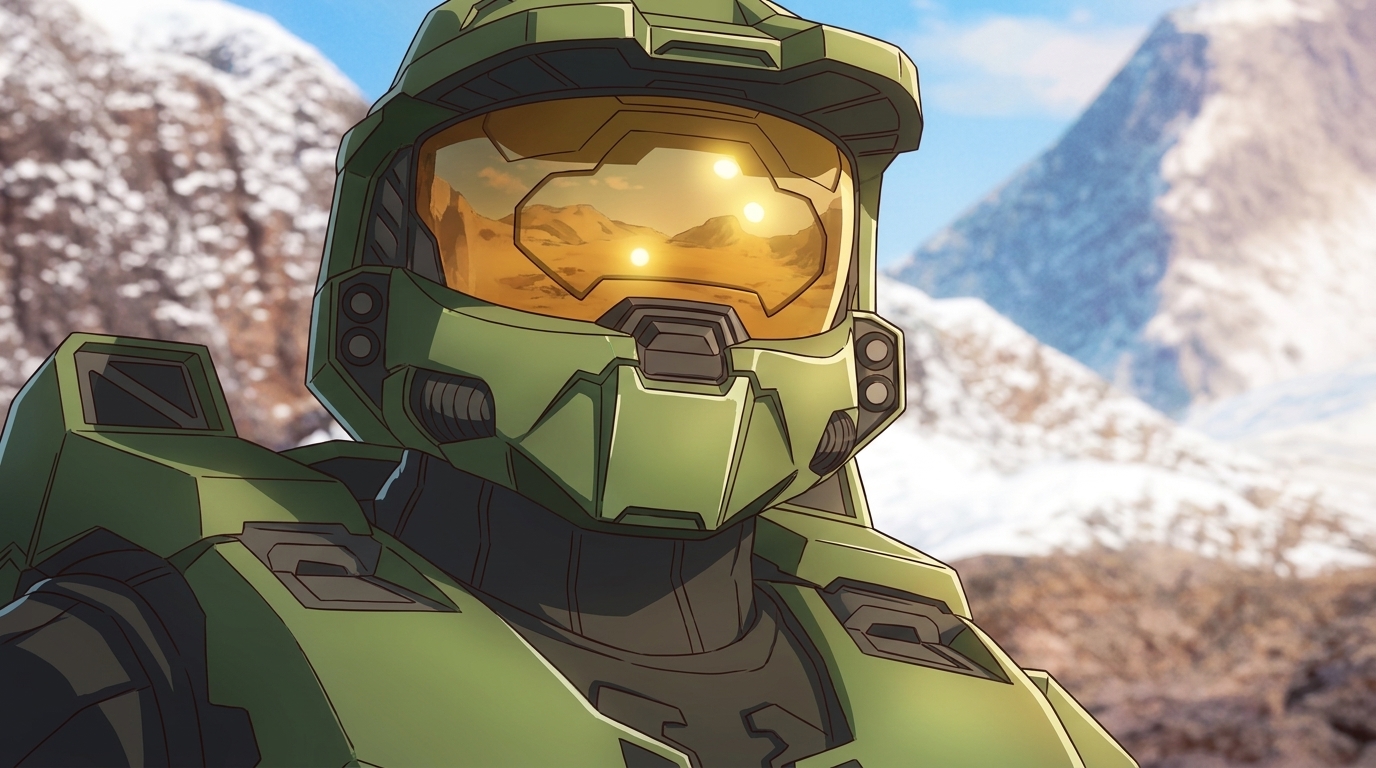
Turn Video Game Characters into Anime Photos and Characters
Reimagine your favorite games. AutoWeeb's photo-to-anime converter brings iconic characters to life in 2D
Turn video game characters into anime photos with AutoWeeb. Upload game screenshots or art, convert to anime style, then build a character sheet and place them in new scenes.
The Best AI Anime Page on TikTok
AutoWeeb's TikTok is where AI anime creators get short-form inspiration, prompt breakdowns, and clips worth recreating.
Looking for the best AI anime page on TikTok? Follow @autoweeb_ for AI anime video clips, prompt ideas, character showcases, and creator tips from the AutoWeeb team.
How to Create Anime Videos with Google Omni Flash
Google's new multimodal video model handles scene cuts, reference images, and natural motion differently from anything else on the market
Learn how to create anime videos with Google Gemini Omni Flash. Starting images, IMAGE_REF tags, scene cuts, dialogue prompts, and what to expect from the preview model.
Seedance 2 vs Omni Flash: Which Should You Use for Anime?
Two leading AI video models, different tagging systems, different motion languages, and side-by-side examples across slice-of-life, action, and sports
Seedance 2 vs Google Omni Flash for anime video: compare frame rate feel, image tagging, scene cuts, audio behavior, sports motion, and content filters with side-by-side clips.
Explore AutoWeeb
Jump into the tool that fits your creative step.
AI Anime Video Generator
Animate storyboard shots into cinematic clips with Seedance 2 and consistent characters.
Anime Character Creator
Design original characters with consistent sheets across every scene.
AI Anime Image Generator
Generate cinematic anime stills anchored to your character library.
Turn Photo Into Anime
Upload any photo and watch AI turn it into stunning anime art in seconds.
AI Anime Location Generator
Create a location set once, then generate reference images from every angle.
AI Anime Storyboarding
Describe your idea, pick your characters, and let AI draft the script and scenes.
AI Anime Prompt Agent
Turn a rough idea into a cinematic Seedance 2 prompt with the AI Director.