
Recreate Anduril's Military Anime Style: Complete AI Tutorial
A full pre-production workflow for military-inspired anime videos: concept art, character design, worldbuilding, cinematic storyboarding, camera composition, lighting, and AI video generation with prompts for soldiers, command centers, vehicles, aircraft, and battlefields.
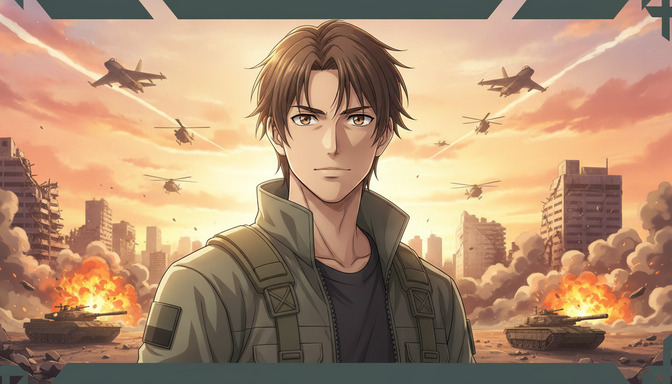
Anduril Industries dropped a promotional animation for their Thunder attack aviation platform that spread across X, Reddit, and defense-tech Twitter faster than most studio anime trailers. The piece did not look like a photorealistic military simulation or a generic AI render. It looked like a high-budget military anime: clean cel-shading on characters, stylized but detailed hardware, golden-hour battlefield lighting, and camera composition that borrowed directly from series like 86 -Eighty Six-, Gundam, and modern tactical anime. The result was a fusion of real defense-industry subject matter and anime visual grammar that felt intentional rather than accidental.
This tutorial covers the full pre-production workflow for recreating that aesthetic with AI tools in AutoWeeb: concept art and mood boards, character design for soldiers and pilots, military worldbuilding for bases and battlefields, cinematic storyboarding, camera composition, lighting techniques, and AI video generation. Build your cast in the anime character creator, then animate key sequences with the AI anime video generator. Every section includes practical prompts you can copy, with an explicit emphasis on anime aesthetics over realism. You are not trying to generate a news broadcast. You are building a military anime short.
Thunder. The New Era of Attack Aviation.
— Anduril Industries (@anduriltech) July 2026
What Makes Anduril's Military Anime Style Work
The Thunder promo succeeds because it treats military hardware as anime set dressing rather than as the subject. The jets, tanks, and command centers are present and detailed, but the frame is composed like an anime key visual: a human or human-scale figure anchors the foreground, the environment communicates scale and stakes, and the lighting does emotional work that a technical diagram never would. Real military footage prioritizes information. Anime military footage prioritizes feeling: the weight of a mission, the scale of a conflict, the calm before an operation.
Three visual principles separate this style from generic military AI art:
- Anime character proportions and linework in the foreground, even when the background hardware is highly detailed.
- Cinematic anime lighting: golden hour, rim light on silhouettes, smoke and dust as compositional layers, not as noise.
- Deliberate camera grammar: low-angle hero shots, wide establishing frames for scale, medium close-ups for operational tension.
The production workflow below builds each of those layers in order, from concept to finished video clip.
Phase 1: Concept Art and Mood Boards
Before you generate a single soldier or tank, define the visual identity of your military anime world. A mood board is not decoration. It is the contract between every subsequent generation. Anduril's piece reads as one coherent production because the palette, lighting direction, and level of stylization stay consistent across every shot.
Establishing Your Visual Pillars
Write three to five visual pillars for your project and keep them in every prompt. For a Thunder-inspired military anime short, those pillars might be:
- Palette: desaturated olive drab and steel gray for equipment, warm orange-gold for sky and explosions, cool blue-gray for shadows.
- Linework: clean anime outlines on characters and vehicles, cel-shaded surfaces, no photorealistic skin or metal textures.
- Scale: human figures at roughly one-third of the frame height in wide shots; hardware fills the upper two-thirds.
- Era: near-future or contemporary military, not World War II or sci-fi mecha unless you commit to one.
Concept Art Prompt for Mood Board Generation
Generate two or three concept panels before character work begins. These are not storyboard panels. They are style anchors.
Example concept art prompt: "Military anime key visual, wide cinematic composition. A lone soldier silhouette in the foreground facing a vast airfield at dawn, rows of fighter jets and transport helicopters receding into atmospheric haze. Golden hour light from the left, long shadows across concrete tarmac. Clean anime linework, cel-shaded, premium military anime production quality similar to 86 Eighty Six or Gundam. Desaturated military palette with warm sky tones. No photorealism, no 3D render look. Concept art panel."
Save the best result to your AutoWeeb project library as your style reference. Every character, vehicle, and environment generation should echo this panel's palette and lighting direction.
Phase 2: Character Design for Soldiers and Pilots
Military anime characters are not generic action figures. They need a face that carries the interior life of the operation: focus under pressure, exhaustion after a long deployment, the particular calm of someone trained for this moment. Anduril's protagonist reads as anime first and soldier second, which is the correct priority for this style.
Building a Soldier Character Sheet
Open the anime character creator and write a complete visual reference. Describe build, hair, expression default, and tactical gear with enough specificity to regenerate consistently across twenty storyboard panels.
Example soldier character sheet prompt: "Male, early twenties, lean athletic build visible through tactical layers rather than exaggerated anime musculature. Messy layered brown hair, amber eyes, expression defaulting to focused and composed under pressure. Olive-green tactical jacket with high collar and visible zipper, dark undershirt, blank rectangular Velcro patch on right shoulder, functional shoulder straps. No insignia or real-world unit markings. Anime style, clean dramatic linework, cel-shaded, military anime protagonist proportions. Face readable at medium close-up distance."
Save this character sheet immediately. The protagonist in the briefing room, on the tarmac, and in the battlefield wide shot must be recognizably the same person. For a multi-scene production, build at least two outfit variations: full combat loadout for field sequences and a lighter flight suit or briefing-room uniform for command scenes.
Supporting Cast: Pilots, Commanders, Ground Crew
Each named character who appears in more than two scenes needs a saved sheet. Focus on silhouette and one defining detail: a pilot's flight helmet tucked under one arm, a commander's cropped silver hair, a ground crew member's orange safety vest over flight-line coveralls.
Example pilot character sheet prompt: "Female, late twenties, sharp-featured anime face, dark hair pulled into a tight operational bun. Flight suit in muted gray-green with harness straps visible at the shoulders, no unit patches. Expression default is professional intensity, eyes forward. Anime style, clean linework, cel-shaded, designed for cockpit and tarmac scenes. Silhouette distinguishable from the ground soldier protagonist by build and gear."
Phase 3: Military Worldbuilding
Worldbuilding in military anime is environmental storytelling: the hangar that has seen a hundred sorties, the command center lit only by tactical displays, the ruined city that tells you this conflict has a history. AutoWeeb location references function like a production bible for each place your story visits.
Command Center Location Reference
Example command center prompt: "Underground military command center, large curved tactical display wall showing a regional map with animated threat markers. Rows of operator stations with glowing monitors, dim overhead lighting, blue and amber screen glow as primary light sources. One elevated command platform at the rear. Concrete and brushed metal surfaces, cable runs visible along the ceiling. Anime style, clean detailed linework, cel-shaded, cinematic wide composition. No photorealistic textures. Atmosphere of controlled urgency."
Military Airbase Location Reference
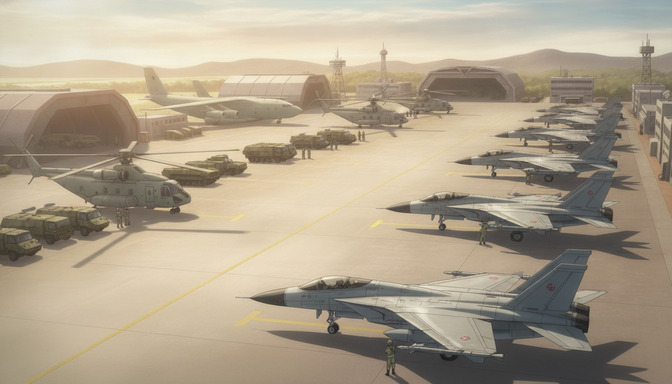
Example airbase prompt: "Expansive military airfield at golden hour, wide concrete tarmac with yellow taxi lines. Foreground: a twin-tail fighter jet with a ground crew member beside it for scale. Midground: a row of parked fighter jets receding into haze. Background: heavy-lift transport helicopters, cargo aircraft near arched-roof hangars, distant mountains under a pale warm sky. Anime style, detailed mechanical design with cel-shading, long soft shadows, premium military anime production quality. Wide establishing shot composition."
Battlefield and Urban Combat Environment
Example battlefield prompt: "Destroyed metropolitan battlefield, crumbling skyscraper skeletons and concrete rubble across the midground. Main battle tanks positioned on either side of the frame, orange explosions and dark smoke plumes rising behind them. Military helicopters at multiple altitudes, fighter jets leaving white contrails in a golden-hour sky. Atmospheric perspective: sharp foreground, hazy background. Anime style, cel-shaded, cinematic military anime scale. Wide shot, low horizon line."
Save each location before generating scenes. When a storyboard panel is set on the airbase, @tag the airbase reference. When it moves to the command center, @tag that reference instead. This is how your world feels like one production rather than a folder of unrelated images. For deeper location documentation at series scale, see the guide on building an AI anime location bible.
Phase 4: Vehicle and Aircraft Design Prompts
Military hardware in anime is stylized, not blueprint-accurate. Tanks have clean geometric silhouettes. Jets have exaggerated twin tails and visible panel lines drawn like illustration, not CAD. The goal is recognizability and cinematic presence, not technical documentation.
Armored Vehicles
Example main battle tank prompt: "Modern main battle tank in dark forest green, advancing across churned battlefield earth, dust clouds trailing behind treads. Low-angle anime composition, tank filling the lower two-thirds of frame against a smoke-filled sky. Clean cel-shaded metal surfaces, simplified but detailed mechanical design, anime military vehicle style. Golden hour rim light on the turret edge. No photorealistic rust or weathering."
Aircraft: Fighters and Helicopters
Example fighter jet prompt: "Twin-tail fighter jet banking in a dramatic sky, white contrail behind it, viewed from slightly below. Clean anime mechanical design with visible panel lines as drawn illustration, not photograph. Afternoon sun from the left creating strong highlight on the fuselage. Cel-shaded, premium military anime quality. Single aircraft centered in frame, clouds and atmospheric haze in background."
Example attack helicopter prompt: "Military attack helicopter in hover position above a battlefield, rotors implied through motion blur lines rather than photorealistic blur. Olive drab and dark gray color scheme, anime cel-shaded rendering. Medium-wide shot with smoke and distant explosions in the background. Camera at eye level with the fuselage."
Phase 5: Cinematic Storyboarding
AutoWeeb's AI Agent can generate a scene-by-scene script and storyboard structure once your character sheets and location references are saved. For a military anime short in the Anduril tradition, structure the narrative around operational beats rather than exposition: the briefing, the launch, the approach, the engagement, the aftermath.
Prompting the AI Agent for a Military Anime Short
Example Agent prompt: "Create a script and storyboard for a five-scene military anime short about a next-generation attack aviation platform. Tone: premium military anime like 86 Eighty Six, emotional restraint, operational professionalism, cinematic scale. Arc: Scene 1, command center briefing with tactical display; Scene 2, pilot and ground crew on the airbase at dawn; Scene 3, aircraft launch sequence; Scene 4, battlefield engagement wide shot with ground forces and air support; Scene 5, return and debrief, golden hour on the tarmac. Include shot descriptions, camera directions, and lighting notes for each panel. No dialogue longer than two lines per scene. Interior monologue optional."
Review the Agent output against your saved assets. Rename characters and locations in the storyboard to match your @tag names. The storyboard is your production plan: every panel is an image you will generate, and the panels in sequence are the edit of the short.
Storyboard Panel Types for Military Anime
A typical five-scene military short uses these panel categories:
- Establishing wide: airbase, battlefield, or command center. Sets geography and scale.
- Character medium close-up: soldier or pilot before the operation. Establishes emotional state.
- Hardware hero shot: aircraft, tank, or vehicle in motion. The visual payoff the audience came for.
- Multi-asset action wide: infantry, armor, and air support in one frame. Requires full @tag discipline.
- Aftermath still: quiet tarmac or empty command center. Closes the operational arc.
Phase 6: Camera Composition
Camera composition is where military anime separates from military stock footage. Directors of series like Gundam and 86 use specific shot grammar to make hardware feel heroic and soldiers feel human. Your prompts need the same specificity. Vague words like "cinematic" or "dramatic" produce random reframing. Named shot sizes and camera heights produce directed sequences.
Shot Sizes for Military Anime
- Extreme wide: Entire airbase or battlefield visible. Use for opening and closing shots. Keep the protagonist small but recognizable.
- Low-angle medium close-up: Soldier or pilot from knee height looking up. The Anduril hero shot. Use for pre-mission tension and character introduction.
- Low-angle wide: Tanks and infantry advancing toward camera. Creates overwhelming forward momentum.
- Over-shoulder medium: Pilot in cockpit or commander at tactical display. Establishes operational context.
- Tracking medium: Aircraft on runway or soldier walking tarmac. Use as a video clip anchor.
For a deeper breakdown of shot sizes and camera height, see Cinematic Angles 101: Frame AI Anime Like a Director.
Example @Tagged Storyboard Shot Prompts
Example hero shot prompt: "Low-angle medium close-up, camera at chest height looking up at @soldier-protagonist standing centered in frame. @battlefield-ruins in the background: tanks on either side, helicopters in the sky, orange explosions and smoke plumes, fighter jets with contrails. Golden hour backlight creating rim light on hair and shoulders. @soldier-protagonist expression focused and calm. Anime style, cel-shaded, premium military anime production quality. No dutch tilt."
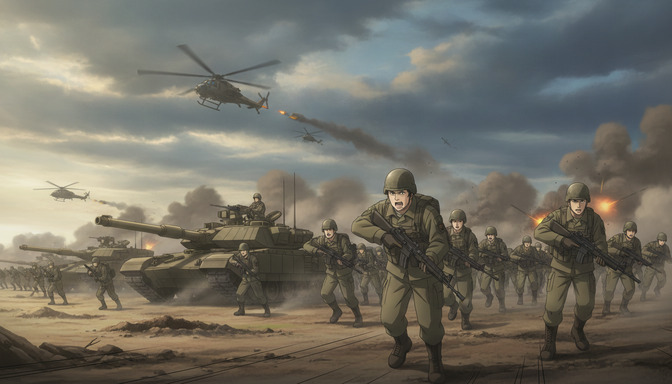
Example infantry assault prompt: "Low-angle wide shot, line of soldiers charging toward camera in mid-stride, @soldier-protagonist centered and mouth open in a shout. Two @main-battle-tanks flanking the infantry line, advancing with dust clouds behind treads. Three helicopters in the overcast sky, missile trails and explosion flashes on the horizon. Golden hour light from the left, long shadows forward. Anime style, cel-shaded, dynamic motion lines on ground. Wide lens perspective."
Example command center prompt: "Wide shot from the rear of @command-center, rows of operator stations with glowing monitors in the foreground. @commander-figure standing on the elevated platform at the center, facing the tactical display wall. Blue and amber screen glow as primary lighting, faces lit from below by monitors. Anime style, clean linework, atmosphere of controlled urgency. Eye-level camera, no dutch tilt."
Phase 7: Lighting Techniques
Lighting is the fastest way to push AI military art toward anime and away from photorealism. Anduril's Thunder promo leans heavily on golden hour, rim lighting, and smoke as a compositional layer. These are anime techniques applied to military subject matter.
Golden Hour and Rim Light
Specify light direction in every prompt. "Golden hour light from the left" or "backlit rim light on silhouette" gives the model a consistent lighting anchor across panels. The protagonist in image one and image twelve should feel like they exist in the same time of day unless the story explicitly moves to night operations.
Example golden hour tarmac prompt: "Military airbase at dawn, warm pale yellow sunlight from the right casting long soft shadows across concrete. @pilot-protagonist walking toward a parked fighter jet in the midground, rim light on shoulders and hair. Atmospheric haze in the distance, parked aircraft receding into soft focus. Anime style, cel-shaded, premium military anime lighting."
Screen Glow and Night Operations
Command center and cockpit scenes use a different lighting grammar: monitor glow as key light, minimal overhead fill, high contrast between lit faces and dark environment.
Example cockpit lighting prompt: "Fighter jet cockpit interior at night, @pilot-protagonist in flight suit, face lit from below by instrument panel glow in blue and amber. Night sky visible through canopy, distant city lights or explosion flashes on the horizon. Anime style, cel-shaded, high contrast lighting, no photorealistic lens flare."
Battlefield Atmosphere
Smoke, dust, and explosion light function as secondary light sources on the battlefield. Layer them explicitly: "orange explosion light from the right midground, dark smoke plume backlit by the setting sun, dust particles visible in the foreground light beam."
Avoid prompts that ask for "realistic lighting" or "documentary style." Those pull the model toward photorealism. "Anime cel-shaded lighting with cinematic color grading" keeps the military anime aesthetic intact.
Phase 8: AI Video Generation
Not every storyboard panel needs to become a video clip. For a military anime short, prioritize motion for the scenes where movement is the content: the tarmac walk before launch, the aircraft takeoff, the infantry charge, the helicopter flyover, and the return landing. Briefing room panels and character close-ups are often stronger as stills.
Writing Motion Prompts for Military Anime Clips
Attach the approved still frame before sending it to the AI anime video generator. Specify one primary motion and one camera behavior. Video models inherit the still's perspective; if the still is already a low-angle wide, ask for forward motion, not a reframing.
Example aircraft launch video prompt: "Wide tracking shot, fighter jet accelerating down runway from background to foreground, afterburner glow intensifying at the two-second mark. Camera static at runway level, low angle. @airbase-tarmac visible on both sides, heat shimmer above the concrete. @pilot-protagonist not visible, aircraft is the subject. Anime style, cel-shaded motion, five to seven seconds. Golden hour lighting consistent with the attached still."
Example infantry charge video prompt: "Low-angle wide shot, line of soldiers running toward camera with @main-battle-tanks advancing on both flanks. Dust clouds rising behind treads, helicopters moving slowly across the sky in the background. Camera holds position as the charge approaches. Anime style, motion lines on the ground, four to six seconds. Explosion flashes on the distant horizon at the three-second mark."
Example helicopter flyover video prompt: "Medium-wide shot, attack helicopter moving from left to right across frame at mid-altitude, rotor motion implied through anime-style blur lines. Smoke and battlefield visible below. Camera pans slowly right to follow. Anime cel-shaded style, four to five seconds, golden hour light from the left."
Assembling the Final Short
Assemble in storyboard order: still panels for briefing and character beats, video clips for launch, engagement, and return sequences. A complete military anime short runs between sixty seconds and two minutes. Export a full cut and a sixty-second highlight version led by the most visually striking clip for social distribution.
For YouTube and X, front-load the hardware hero shot or the infantry charge in the first three seconds. For the thumbnail, use the low-angle protagonist frame or the airbase golden-hour wide. Both read at small sizes and communicate the military anime genre immediately.
Anime vs. Realism: Prompt Language That Keeps the Style
The most common failure mode in military AI art is drifting toward photorealism mid-production. These prompt swaps keep every generation in anime territory:
- Replace photorealistic military with anime cel-shaded military, clean linework, premium military anime production quality.
- Replace realistic metal textures with cel-shaded mechanical surfaces with illustrated panel lines.
- Replace documentary lighting with cinematic anime lighting, golden hour, rim light.
- Replace hyper-detailed face with anime facial proportions, expressive eyes, clean jawline.
- Add no photorealism, no 3D render look when the model drifts toward game-engine aesthetics.
Reject any panel that looks like a photograph with an anime filter applied. Regenerate with the style anchor repeated twice in the prompt if needed. Consistency at the image stage makes the video stage considerably cleaner.
Frequently Asked Questions
What made Anduril's Thunder anime promo go viral?
The combination of real defense-industry subject matter and premium military anime visual grammar. Audiences on X and Reddit already respond to anime-style military content in games and fan animation. Anduril's piece looked like it belonged in that tradition while showcasing actual hardware and operational concepts. The golden-hour lighting, cel-shaded characters, and cinematic scale made it shareable beyond defense-tech circles.
Can I recreate this style without copying Anduril's specific aircraft or branding?
Yes, and you should. This tutorial teaches the production aesthetic: anime character design, military worldbuilding, cinematic composition, and AI video workflow. Build original characters, fictional unit markings, and generic near-future hardware. The visual language is what you are replicating, not proprietary product designs.
How do I keep soldiers and vehicles consistent across multiple scenes?
Save character sheets and location references to your AutoWeeb project library, then @tag them in every storyboard shot prompt. Describing a soldier from scratch in each panel causes drift: hair shifts, gear changes, proportions vary. @tagging draws from your saved visual anchor instead of reconstructing from prompt context.
Which scenes should I prioritize for video generation?
Prioritize clips where motion is the content: aircraft launch and flyover, infantry charge, tank advance, helicopter pass, and tarmac walk sequences. Briefing room panels, command center wides, and character close-ups work as stills without losing emotional information. Spend video generation budget on the scenes a freeze frame would make feel incomplete.
What anime series should I study for military aesthetic reference?
86 -Eighty Six- for battlefield scale and emotional restraint. Mobile Suit Gundam and Gundam Wing for mecha and military base composition. Jormungand and Full Metal Panic! for contemporary military gear in anime style. Violet Evergarden for golden-hour lighting technique. Collect screenshots and build a mood board before generating.
How long does a complete military anime short take to produce in AutoWeeb?
A five-scene short with four to five video clips typically takes two to three focused sessions. Session one covers concept art, character sheets, and location references. Session two covers AI Agent scripting, storyboard generation, and image generation across all panels. Session three covers video generation for priority scenes and final assembly. Working in discrete sessions makes it easier to catch visual drift before committing to the next stage.
How do I avoid my military anime looking like a video game cutscene?
Specify "anime cel-shaded, clean linework, no 3D render look" in every prompt. Reject panels with overly smooth plastic surfaces or game-engine lighting. Anime military art has drawn panel lines on vehicles, expressive eyes on characters, and compositional choices that feel illustrated rather than simulated. When in doubt, reference a specific anime production style in the prompt.
For the broader production pipeline, including multi-character scene consistency and serialized YouTube workflows, see how to create anime videos like Kalshi's World Cup shorts for the full @tag storyboard workflow, and the AI anime battle generator guide for action sequence prompting. For camera documentation at series scale, build a camera bible once your shot vocabulary is locked. Start with the anime character creator to lock your cast, then move finished panels into the AI anime video generator for launch, charge, and flyover sequences.
Related Blog Posts
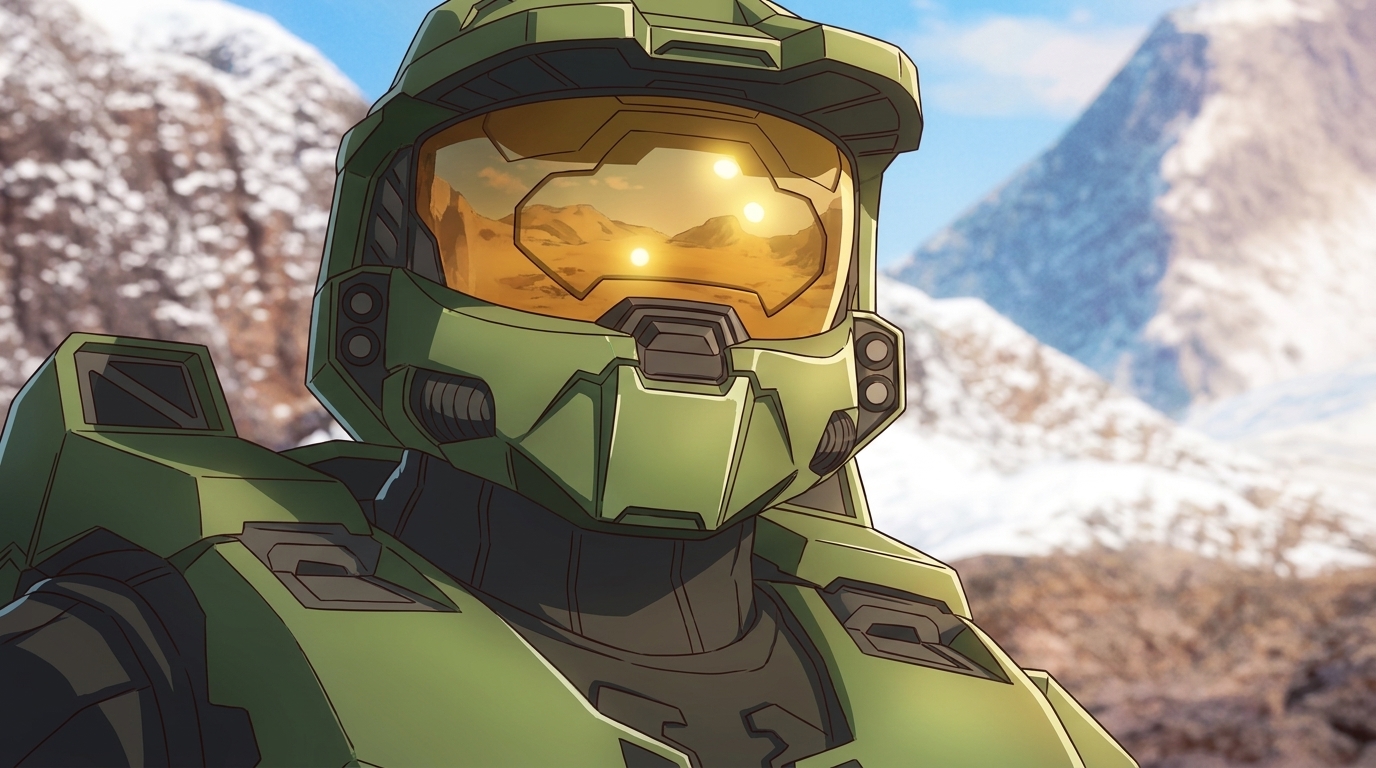
Turn Video Game Characters into Anime Photos and Characters
Reimagine your favorite games. AutoWeeb's photo-to-anime converter brings iconic characters to life in 2D
Turn video game characters into anime photos with AutoWeeb. Upload game screenshots or art, convert to anime style, then build a character sheet and place them in new scenes.
The Best AI Anime Page on TikTok
AutoWeeb's TikTok is where AI anime creators get short-form inspiration, prompt breakdowns, and clips worth recreating.
Looking for the best AI anime page on TikTok? Follow @autoweeb_ for AI anime video clips, prompt ideas, character showcases, and creator tips from the AutoWeeb team.
How to Create Anime Videos with Google Omni Flash
Google's new multimodal video model handles scene cuts, reference images, and natural motion differently from anything else on the market
Learn how to create anime videos with Google Gemini Omni Flash. Starting images, IMAGE_REF tags, scene cuts, dialogue prompts, and what to expect from the preview model.
Seedance 2 vs Omni Flash: Which Should You Use for Anime?
Two leading AI video models, different tagging systems, different motion languages, and side-by-side examples across slice-of-life, action, and sports
Seedance 2 vs Google Omni Flash for anime video: compare frame rate feel, image tagging, scene cuts, audio behavior, sports motion, and content filters with side-by-side clips.
Explore AutoWeeb
Jump into the tool that fits your creative step.
AI Anime Video Generator
Animate storyboard shots into cinematic clips with Seedance 2 and consistent characters.
Anime Character Creator
Design original characters with consistent sheets across every scene.
AI Anime Image Generator
Generate cinematic anime stills anchored to your character library.
Turn Photo Into Anime
Upload any photo and watch AI turn it into stunning anime art in seconds.
AI Anime Location Generator
Create a location set once, then generate reference images from every angle.
AI Anime Storyboarding
Describe your idea, pick your characters, and let AI draft the script and scenes.
AI Anime Prompt Agent
Turn a rough idea into a cinematic Seedance 2 prompt with the AI Director.